
Copic Marker Nib Replacement

Iris Lin and 3 other contributors
Last updated on Jun 23, 2017
Views: 3.7K
View statistics:
- Past 24 Hours:
- 4
- Past 7 Days:
- 24
- Past 30 Days:
- 125
- All Time:
- 3,660
Comments: 0
No one has left comments on this guide. Will you be first?
Go to guide commentsCompleted: 2 3
2 people have marked this guide "completed." Will you be next?
3 people have marked this guide "completed." Including you — great job!
Favorites: 2 3
2 people have favorited (and subscribed to) this guide. Will you be next?
3 people have favorited (and subscribed to) this guide — including you!
Introduction
Go to step 1 ↓Tired of buying new Copic Markers? Wish you could just simply replace the nib? Well, this is the guide for you!
After using a Copic Marker for a long period of time and the nib begins to curl and fray, it is time to replace it. The ink also should be refilled simultaneously at this point as it is running low. The only tools needed to complete this guide are some paper towels and a pair of tweezer!
What you need
Parts
Tools


-
-
-
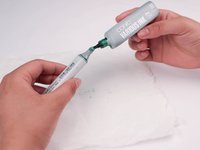
Remove the cap of the ink bottle and tilt the container to begin filling the marker.
-
-
-
-
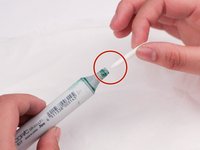
Insert the flat side of the new nib facing the opening of the marker until it snaps into place.
-
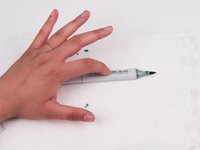
Set the marker down after replacing new nib.
-
-
-
Wait 3 minutes for the color to spread through the nib until it is no longer white.
-
Press on the middle of the marker 3 times to insure ink is spread throughout.
-

 Ask FixBot







Cancel: I did not complete this guide.
2 other people completed this guide.

Team

UC Davis, Team S1-G5, Coad Spring 2017 Member of UC Davis, Team S1-G5, Coad Spring 2017
UCD-COAD-S17S1G5
3 Members
12 Guides authored
