Introduction
Have you tried everything and your camera just won't turn on? No worries! This guide will show you how to successfully remove your battery.
What you need
-
-
-
Take the Hex and PH000 bit to remove a 2mm screw from the left side of the camera.
-
Next, remove the 2mm screw from the right side.
-
Lastly, remove the 3mm screw from the bottom of the camera.
 Ask FixBot
-
-
-
-
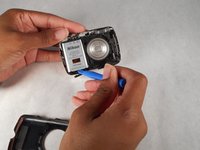
Once the two 2mm screws and the 3 mm screw have been removed, use the smallest plastic opening tool and pull up on the sides to reveal the inside of the camera.
-
Next, use the same small plastic opening tool and gently pull out the battery.
-
To reassemble, follow the steps in reverse order.
-
-


To reassemble your device, follow these instructions in reverse order.
Cancel: I did not complete this guide.
5 other people completed this guide.

Team

Sam Houston State, Team 2-3, Blackburne Fall 2015 Member of Sam Houston State, Team 2-3, Blackburne Fall 2015
SHSU-BLACKBURNE-F15S2G3
4 Members
60 Guides authored
