
Connecting TI-Nspire to a Computer

Rueben Rodriguez and 5 other contributors
Last updated on Feb 17, 2022
Views: 100K
View statistics:
- Past 24 Hours:
- 2
- Past 7 Days:
- 40
- Past 30 Days:
- 159
- All Time:
- 99,788
Comments: 7
1 comment on steps, 6 guide comments.
Go to guide commentsCompleted: 19 20
19 people have marked this guide "completed." Will you be next?
20 people have marked this guide "completed." Including you — great job!
Favorites: 0 1
No one has favorited (and subscribed to) this guide. Will you be the first?
1 person has favorited (and subscribed to) this guide — and that's you!
Introduction
Go to step 1 ↓This guide will provide the steps for connecting your calculator to your computer.
What you need
Tools
-
-
-
Download the software to allow you to connect your calculator to your computer from the Texas Instrument Website: http://education.ti.com/calculators/down...
 Ask FixBot
-
-
-
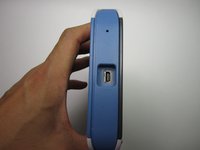
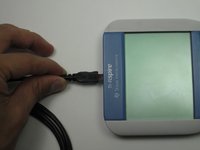
Make sure you have a TI USB cable to connect your calculator and computer
-
The ends of the cable should look like those in this picture
-
-
-



Cancel: I did not complete this guide.
19 other people completed this guide.

Team

Cal Poly, Team 7-52, Forte Fall 2012 Member of Cal Poly, Team 7-52, Forte Fall 2012
CPSU-FORTE-F12S7G52
5 Members
108 Guides authored
6 Guide Comments
The link worked, and I can connect! Thanks!!
