
Compaq Presario v2000 RAM Replacement

Viscous and
Last updated on Mar 7, 2024
Views: 725
View statistics:
- Past 24 Hours:
- 2
- Past 7 Days:
- 17
- Past 30 Days:
- 72
- All Time:
- 725
Comments: 0
No one has left comments on this guide. Will you be first?
Go to guide commentsCompleted: 0 1
No one has marked this guide "completed." Will you be the first?
1 person has marked this guide "completed." It's you — great job!
Favorites: 0 1
No one has favorited (and subscribed to) this guide. Will you be the first?
1 person has favorited (and subscribed to) this guide — and that's you!
Community-Contributed Guide
An awesome member of our community made this guide. It was not created by iFixit staff.
What you need

Introduction
Go to step 1 ↓This is a guide on how to replace the RAM for a Compaq Presario V2000.
-
-
-
Loosen the 2 Phillips screws with RAM icons above them. Don’t worry if the screws won’t come out, as they’re attached to the door.
-
Lift the RAM door up and away.
 Ask FixBot
-
-
-
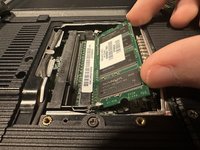
There are two metal clips holding both RAM modules in place.
-
To unclip them, push them both outwards from the RAM stick with your fingers until it pops out and sticks up at an angle.
-
Pull the stick of RAM out.
-
Repeat the last 3 steps for the bottom RAM stick.
-
-
-
-
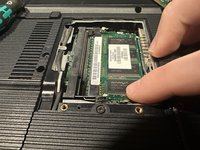
Start at the bottom slot. Insert the new RAM at the same angle the previous RAM popped out at.
-
Push the RAM in until a click is heard.
-
Repeat the last 2 steps for the top slot.
-
-
-
Repeat the first part of this guide to reinstall the RAM door.
-
-



If you encounter problems after installing new RAM, redo this guide, or follow a RAM troubleshooting guide.

