
Compaq Presario CQ58 RAM Memory Replacement

Last updated on Oct 29, 2021
Views: 12K
View statistics:
- Past 24 Hours:
- 3
- Past 7 Days:
- 28
- Past 30 Days:
- 123
- All Time:
- 11,719
Comments: 0
No one has left comments on this guide. Will you be first?
Go to guide commentsCompleted: 4 5
4 people have marked this guide "completed." Will you be next?
5 people have marked this guide "completed." Including you — great job!
Favorites: 1 2
1 person has favorited (and subscribed to) this guide. Will you be next?
2 people have favorited (and subscribed to) this guide — including you!
Community-Contributed Guide
An awesome member of our community made this guide. It was not created by iFixit staff.
Introduction
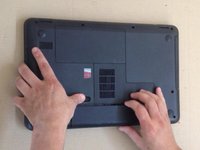
Go to step 1 ↓How to upgrade or replace the DDR3 RAM Modules in Compaq Presario CQ58.
What you need


Video Overview
-
-
-
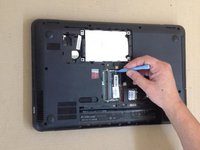
Use a plastic tool to open lockers of the memory module.
-
Remove the old one DDR3 RAM Memory module and insert the new one.
-
Did you do it successfully?
-
-



 Ask FixBot




To reassemble your device, follow these instructions in reverse order.
Cancel: I did not complete this guide.
4 other people completed this guide.


