Free Shipping on Domestic Orders $75+

Compaq Presario CQ58 Keyboard Replacement

What you need

Video Overview

    1. Compaq Presario CQ58 Keyboard Replacement, Keyboard: step 1, image 1 of 3 Compaq Presario CQ58 Keyboard Replacement, Keyboard: step 1, image 2 of 3 Compaq Presario CQ58 Keyboard Replacement, Keyboard: step 1, image 3 of 3
      • Remove the Battery.

      • Remove the RAM Memory Cover.

      • Under the cover you ca find one screw with keyboard symbol next to him. This screw is held the Keyboard.

      Ask FixBot

      Add Comment

    2. Compaq Presario CQ58 Keyboard Replacement: step 2, image 1 of 3 Compaq Presario CQ58 Keyboard Replacement: step 2, image 2 of 3 Compaq Presario CQ58 Keyboard Replacement: step 2, image 3 of 3
      • The Keyboard is held by 5X locking clips.

      Ask FixBot

      Add Comment

    3. Compaq Presario CQ58 Keyboard Replacement: step 3, image 1 of 2 Compaq Presario CQ58 Keyboard Replacement: step 3, image 2 of 2
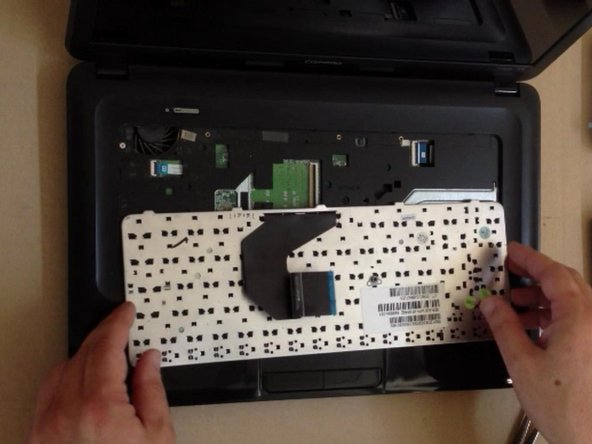
      • Disconnect the Keyboard Flex cable and install the new Keyboard.

      • Did you do it successfully?

      Ask FixBot

      Add Comment

Conclusion

To reassemble your device, follow these instructions in reverse order.

Cancel: I did not complete this guide.

9 other people completed this guide.

ZFix

Member since: 12/09/13

197,600 Reputation

330 Guides authored

Team

Master Techs Member of Master Techs

Community

334 Members

8,251 Guides authored

2 Guide Comments

Great guild on the Keyboard 5X locking clips . Was really having a time on getting the 1st one to pop this helped greatly!

Wolf LeMay - Reply Share

I did it

tnx bro

Zaid Ahmed - Reply Share

Add Comment

View Statistics:

Past 24 Hours: 3

Past 7 Days: 9

Past 30 Days: 51

All Time: 11,616