Free Shipping on Domestic Orders $75+

Compaq Evo N1000v Top Cover Replacement

What you need

    1. Compaq Evo N1000v Top Cover Replacement, LED Cover: step 1, image 1 of 1
      • Flip the laptop over with the rear panel facing forward.

      Ask FixBot

      Add Comment

    2. Compaq Evo N1000v Top Cover Replacement: step 2, image 1 of 1
      • Using a TR8 Torx screwdriver, remove the two T8 Torx screws that secure the LED cover to the base enclosure.

      Ask FixBot

      Add Comment

    3. Compaq Evo N1000v Top Cover Replacement: step 3, image 1 of 1
      • Flip the laptop back over with the front facing forward. Open the screen.

      Ask FixBot

      Add Comment

    4. Compaq Evo N1000v Top Cover Replacement: step 4, image 1 of 1
      • Locate the F1 and F2 keys near the top left corner of the keyboard.

      Ask FixBot

      Add Comment

    5. Compaq Evo N1000v Top Cover Replacement: step 5, image 1 of 1
      • While holding the F1 and F2 keys, insert a spudger between the keys into the notch in the LED cover. Lift up.

      Ask FixBot

      Add Comment

    6. Compaq Evo N1000v Top Cover Replacement: step 6, image 1 of 1
      • Locate the Scroll and Pause keys near the top right corner of the keyboard.

      Ask FixBot

      Add Comment

    7. Compaq Evo N1000v Top Cover Replacement: step 7, image 1 of 1
      • While holding the Scroll and Pause keys, insert a spudger between the keys into the notch in the LED cover. Lift up.

      Ask FixBot

      Add Comment

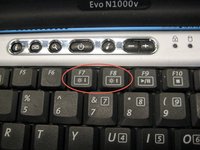
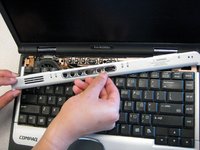
    8. Compaq Evo N1000v Top Cover Replacement: step 8, image 1 of 2 Compaq Evo N1000v Top Cover Replacement: step 8, image 2 of 2
      • Insert a spudger between the F7 and F8 keys. Lift up to remove the LED cover.

      Ask FixBot

      Add Comment

    1. Compaq Evo N1000v Top Cover Replacement, Keyboard: step 9, image 1 of 1
      • Lift the back edge of the keyboard and pull towards the screen.

      Ask FixBot

      Add Comment

    2. Compaq Evo N1000v Top Cover Replacement: step 10, image 1 of 1
      • Pull the cable and lift up to release.

      Ask FixBot

      Add Comment

    3. Compaq Evo N1000v Top Cover Replacement: step 11, image 1 of 1
      • Remove the keyboard.

      Ask FixBot

      Add Comment

    1. Compaq Evo N1000v Top Cover Replacement, Heat Sink: step 12, image 1 of 1
      • Disconnect the cable connecting the fan to the system board.

      Ask FixBot

      Add Comment

    2. Compaq Evo N1000v Top Cover Replacement: step 13, image 1 of 1
      • Remove the four screws from the heat sink.

      Ask FixBot

      Add Comment

    3. Compaq Evo N1000v Top Cover Replacement: step 14, image 1 of 1
      • Pull the the heat sink up and out of the computer.

      Ask FixBot

      Add Comment

    1. Compaq Evo N1000v Top Cover Replacement, Palm Rest: step 15, image 1 of 1
      • Close the laptop and flip it so the rear panel is facing up.

      Ask FixBot

      Add Comment

    2. Compaq Evo N1000v Top Cover Replacement: step 16, image 1 of 1
      • Using the TR8 Torx screwdriver, remove the six screws from the back case.

      Ask FixBot

      Add Comment

    3. Compaq Evo N1000v Top Cover Replacement: step 17, image 1 of 1
      • Remove the battery.

      • Remove the screw from the metal support on the case edge with a Torx T8 screwdriver.

      • Flip the laptop over again so the top is facing up.

      • Open the laptop screen and face it towards you.

      Ask FixBot

      Add Comment

    4. Compaq Evo N1000v Top Cover Replacement: step 18, image 1 of 1
      • Lift the the palm rest up from the front edge of the laptop and swing it towards the screen.

      • Be gentle as it is connected by some cables.

      Ask FixBot

      Add Comment

    5. Ask FixBot

      Add Comment

    6. Compaq Evo N1000v Top Cover Replacement: step 20, image 1 of 1
      • Disconnect the second ribbon cable.

      Ask FixBot

      Add Comment

    7. Compaq Evo N1000v Top Cover Replacement: step 21, image 1 of 1
      • Remove the palm rest.

      Ask FixBot

      Add Comment

    1. Compaq Evo N1000v Top Cover Replacement, Top Cover: step 22, image 1 of 1
      • Turn the laptop bottom side up.

      Ask FixBot

      Add Comment

    2. Compaq Evo N1000v Top Cover Replacement: step 23, image 1 of 1
      • Remove the two TM 2.5mm x 8.0mm screws that secure the top cover to the base.

      Ask FixBot

      Add Comment

    3. Compaq Evo N1000v Top Cover Replacement: step 24, image 1 of 1
      • Turn the base top side up with the front facing forward.

      Ask FixBot

      Add Comment

    4. Compaq Evo N1000v Top Cover Replacement: step 25, image 1 of 1
      • Remove the three TM 2.5 mm x 5.0 mm screws that secure the top cover to the base.

      Ask FixBot

      Add Comment

    5. Compaq Evo N1000v Top Cover Replacement: step 26, image 1 of 1
      • Lift the top cover straight up about one inch, then slide forward until the microphone cable is exposed.

      • Disconnect the microphone cable from the system board.

      Ask FixBot

      Add Comment

    6. Compaq Evo N1000v Top Cover Replacement: step 27, image 1 of 1
      • Remove the top cover from the base.

      Ask FixBot

      Add Comment

Conclusion

To reassemble your device, follow these instructions in reverse order.

Cancel: I did not complete this guide.

Alex Hernandez

Member since: 04/14/10

49 Reputation

4 Guides authored

Team

Cal Poly, Team 29-74, Johann Spring 2010 Member of Cal Poly, Team 29-74, Johann Spring 2010

CPSU-JOHANN-S10S29G74

3 Members

84 Guides authored

0 Guide Comments

Add Comment

View Statistics:

Past 24 Hours: 0

Past 7 Days: 6

Past 30 Days: 32

All Time: 3,562