Free Shipping on Domestic Orders $75+

Commodore 64 3AG fuse Replacement

Views: 5.1K

View statistics:

Past 24 Hours:
6
Past 7 Days:
25
Past 30 Days:
113
All Time:
5,093
Comments: 4

2 comments on steps, 2 guide comments.

Go to guide comments
Completed: 4

4 people have marked this guide "completed." Will you be next?

Favorites: 0

No one has favorited (and subscribed to) this guide. Will you be the first?

Time Required: 1 minute
Difficulty: Very easy
Incorrect Tools

Help make this guide better by using the correct tools in images and/or text.

Community-Contributed Guide

An awesome member of our community made this guide. It was not created by iFixit staff.

Commodore 64 3AG fuse Replacement

Introduction

Go to step 1 ↓

A 3AG fuse is a glass - bodied fuse designed to break an electric circuit if the current exceeds safety levels in a Commodore 64 device

What you need

Tools

  • Phillips #00 Screwdriver
    4.9
  • Spudger
    4.9
    1. Commodore 64 3AG fuse Replacement, Removing screws: step 1, image 1 of 3 Commodore 64 3AG fuse Replacement, Removing screws: step 1, image 2 of 3 Commodore 64 3AG fuse Replacement, Removing screws: step 1, image 3 of 3
      • 1. Remove three 6.75mm ph2 screw heads from the casing

      Ask FixBot

      Add Comment

    2. Commodore 64 3AG fuse Replacement, Opening: step 2, image 1 of 2 Commodore 64 3AG fuse Replacement, Opening: step 2, image 2 of 2
      • 2. Split the case of the C64 open by pulling up on the case towards you

      • Do not pull too hard that you break the clips.

      Ask FixBot

      Add Comment

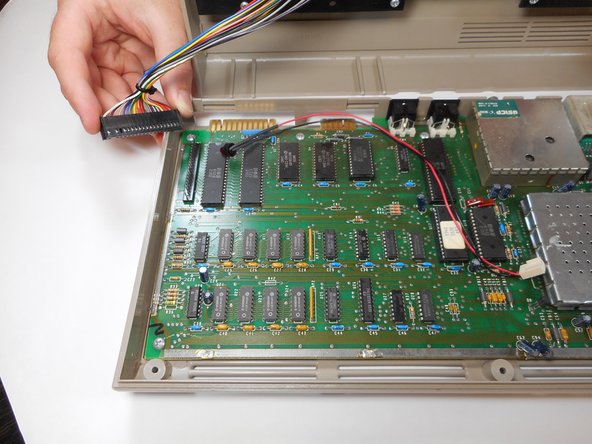
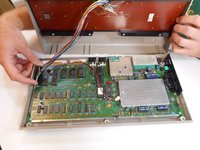
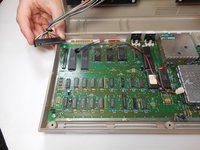
    1. Commodore 64 3AG fuse Replacement, Detach Keyboard from motherboard: step 3, image 1 of 2 Commodore 64 3AG fuse Replacement, Detach Keyboard from motherboard: step 3, image 2 of 2
      • 1. Detach the multi-colored wire bundles that's connected to the motherboard

      • In this picture, the power indication LED (connected to the black and red wires) is not fastened to the keyboard panel, yours might be different.

      Ask FixBot

      Add Comment

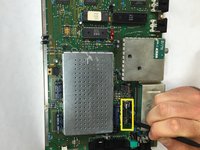
    2. Commodore 64 3AG fuse Replacement, Locate 3AG fuse: step 4, image 1 of 1
      • 2. Find the 3AG fuse located next to the joystick ports and On/Off switch

      Ask FixBot

      Add Comment

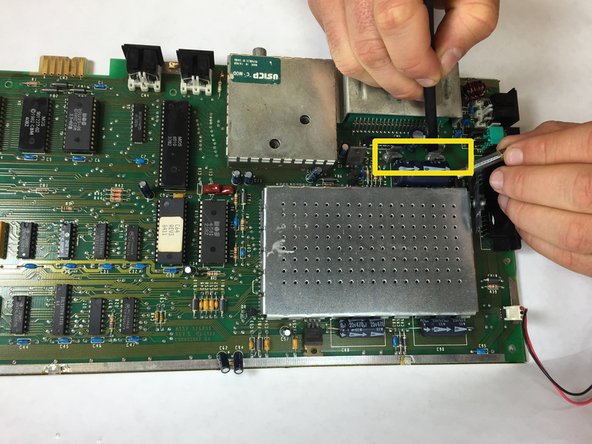
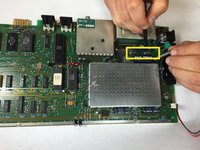
    3. Commodore 64 3AG fuse Replacement, Removing the 3AG fuse: step 5, image 1 of 2 Commodore 64 3AG fuse Replacement, Removing the 3AG fuse: step 5, image 2 of 2
      • 3. Using the ifixit splugger, prop out the 3AG fuse from the clip.

      • * Replace the 3AG fuse by inserting the new fuse and letting it pop into the clip

      Ask FixBot

      Add Comment

Conclusion

To reassemble your device, follow these instructions in reverse order.

Cancel: I did not complete this guide.

4 other people completed this guide.

Silvanus Clarke

Member since: 09/26/14

677 Reputation

5 Guides authored

Team

USF Tampa, Team 13-6, Staggers Fall 2014 Member of USF Tampa, Team 13-6, Staggers Fall 2014

USFT-STAGGERS-F14S13G6

4 Members

60 Guides authored

2 Guide Comments

The fuse is 1.5 Amp, not 3

JC Andy - Reply Share

3AG does NOT mean a fast acting fuse. It could be either fast or slow blow. The 3 means it's 1 1/4 " long, the "A" means it has Axial connections, and the "G" means it's made of glass.

Toon Konings - Reply Share

Add Comment

View Statistics:

Past 24 Hours: 6

Past 7 Days: 25

Past 30 Days: 113

All Time: 5,093