
ColecoVision Controller Circuit Board Replacement

Juin Yeh and 2 other contributors
Last updated on Jan 5, 2019
Views: 1.7K
View statistics:
- Past 24 Hours:
- 3
- Past 7 Days:
- 13
- Past 30 Days:
- 79
- All Time:
- 1,654
Comments: 0
No one has left comments on this guide. Will you be first?
Go to guide commentsCompleted: 0 1
No one has marked this guide "completed." Will you be the first?
1 person has marked this guide "completed." It's you — great job!
Favorites: 0 1
No one has favorited (and subscribed to) this guide. Will you be the first?
1 person has favorited (and subscribed to) this guide — and that's you!
Action Shots
Be an action hero! This guide needs images that better demonstrate how to perform specific actions.
Introduction
Go to step 1 ↓The purpose of this guide is to show step-by-step instructions on how to replace the circuit board of a ColecoVision game controller.
What you need
Tools

-
-
-
Place the controller with the back panel up (buttons down).
-
Remove the five 15mm screws on the back with a Phillips #1 screwdriver.
-
-
-
Turn the device around.
-
Separate the front panel from the rest of the controller and set aside.
-
-
-
-
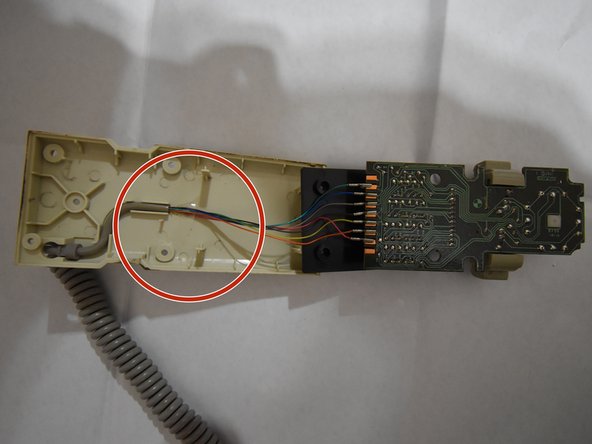
Remove the tape and wiring holding the wires in place.
-
Carefully lift the circuit board out of the controller.
-


 Ask FixBot


To reassemble your device, follow these instructions in reverse order.

Team

UW Tacoma, Team S1-G2, Rose Fall 2018 Member of UW Tacoma, Team S1-G2, Rose Fall 2018
UWT-ROSE-F18S1G2
4 Members
72 Guides authored
