Introduction
If your Coby Kyros MID9042 isn't holding a charge or you know that the battery is broken or needs to be replaced, use this guide to replace the battery. This battery provides power to the entire tablet and a faulty or damaged battery will render the tablet useless. before using this guide be sure to unplug the device and make sure the charging port is clear of any debris. Make sure most of the dust and debris is removed with a brush or cloth. Also, make sure to completely power off the device
What you need
-
-
-
Remove anti-slip pads from all four corners of the back of the device with a nylon spudger.
-
Remove the four 1/8" screws using a Phillips #0 screwdriver.
 Ask FixBot
-
-
-
-
Use an opening tool to wedge the back cover apart from the front.
-
Once the edges are wedged apart, use your hands to remove the back of the tablet.
-
-
Tool used on this step:Tweezers$4.99
-
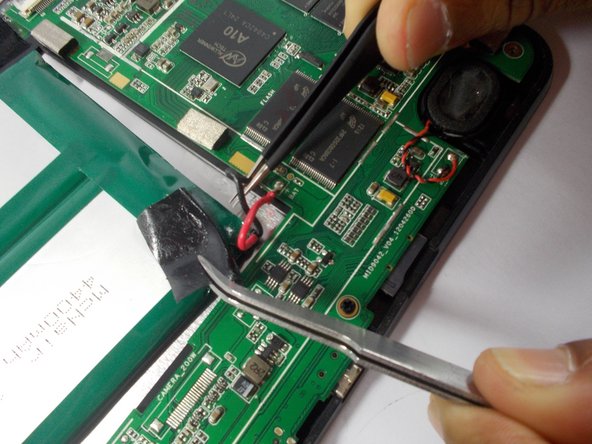
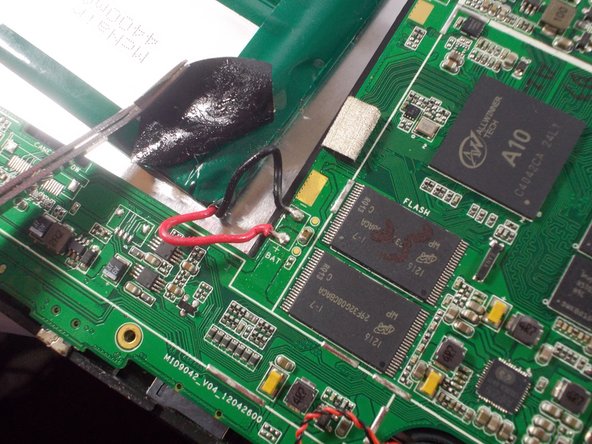
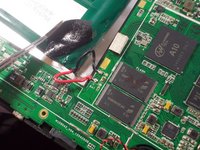
With the soldering iron, desolder the red and black battery wires from the circuit board.
-
Use the tweezers to connect the red wire to the positive and the black wire to the negative.
-
-



To reassemble your device, follow these instructions in reverse order.
Cancel: I did not complete this guide.
2 other people completed this guide.

Team

UMass Dartmouth, Team 2-6, Shastany Spring 2015 Member of UMass Dartmouth, Team 2-6, Shastany Spring 2015
UMASSD-SHASTANY-S15S2G6
4 Members
36 Guides authored
