Introduction
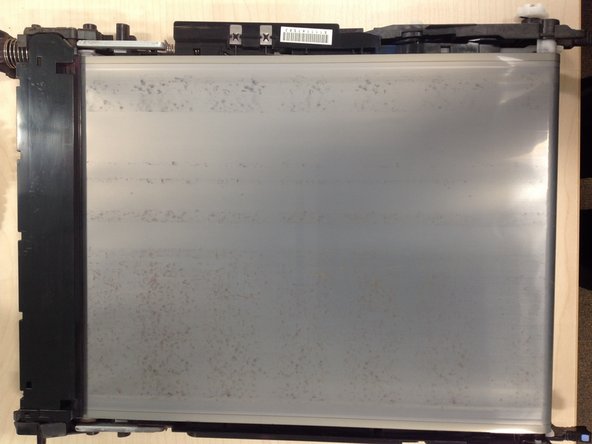
Intermittent dirty vertical marks on the printout that repeat every 3rd page indicate that the intermediate transfer belt is not being properly cleaned. This guide explains how to resolve cleaning problems.
-
-
-
The distance between repetitions of a print quality problem provides the best clue to identify the source. Intermediate transfer belt problems repeat every 70cm which corresponds to 2.3 A4 pages. Intermittent dark vertical strips indicate that the Intermediate Transfer belt is not being effectively cleaned.
-
Experience from a school that prints 200,000 pages a year on these printers shows the majority of print quality problems are caused by the toner cartridges rather than the ITB. The cause of these faults is readily proved by swapping cartridges. Typically 5% to 20% of compatible toner cartridges cause print quality problems.
-
For the small minority of quality problems that persist across multiple toner cartridges, the cause of dirty printouts has usually been the ITB.
-
Other guides describe manually cleaning the belt which, although easy to do, provides only a short term benefit if the underlying cause is that the wiper blade is not cleaning the belt.
-
A roughness as the belt passes over the roller might be caused by disintegrating foam rollers that support the belt from inside the ITB unit. Replacing the entire ITB unit may be the only solution in this case.
 Ask FixBot
-
-
-
-
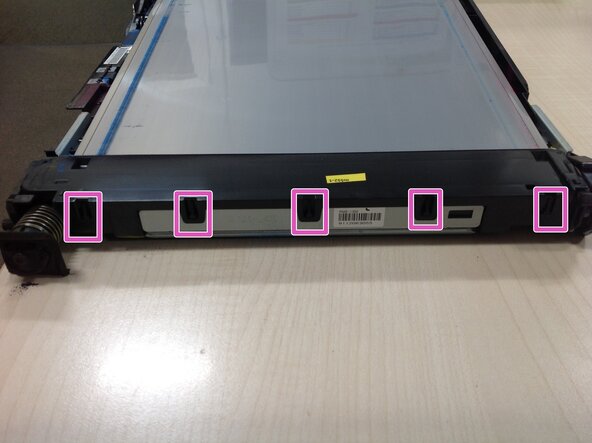
Gently pull back the five plastic clips holding down the lid on the toner collector attached to the end of the Intermediate Transfer Belt.
-
The plastic lid can now be lifted off the toner collector. After a little gentle wiggling it will come away.
-
The waste toner can now be emptied out
-
-
-
Sometimes the wiper blade can be cleaned adequately without further dismantling.
-
This brief video clip shows how a thin plastic sheet can be inserted between the wiper blade and the belt then dragged along. The labels supermarkets attach to their fruit nets are a suitable cleaning tool.
-
-
-
Cleaning the foam strip on the underside of the ITB may improve the quality.
-
The foam strip can be lifted slightly when cleaning to creat a gap for the waste toner to escape
-
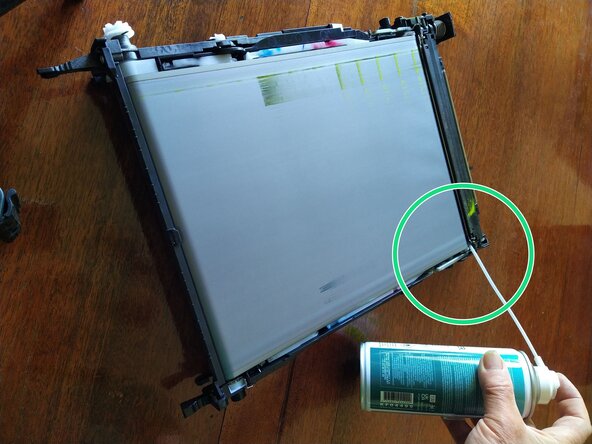
Compressed air can remove the waste toner from behind the foam strip.
-
A thin plastic sheet can be inserted between the foam and the belt, then dragged along. The lumps shown in the picture were extracted in this way.
-
-
-
Put the cleaned belt back into service and observe the performance. If the ITB continues to cause intermittent print quality it may be time to replace the ITB.
-
For the more determined or adventurous repairer the ITB repair guide provides a comprehensive tour through the more risky and difficult repair steps.
-
-