
Cleaning the Fan Blades

Vivian Fong and 5 other contributors
Last updated on Jan 28, 2014
Views: 12K
View statistics:
- Past 24 Hours:
- 5
- Past 7 Days:
- 25
- Past 30 Days:
- 135
- All Time:
- 11,885
Comments: 1
1 comment on steps.
Completed: 1 2
1 person has marked this guide "completed." Will you be next?
2 people have marked this guide "completed." Including you — great job!
Favorites: 4 5
4 people have favorited (and subscribed to) this guide. Will you be next?
5 people have favorited (and subscribed to) this guide — including you!
Action Shots
Be an action hero! This guide needs images that better demonstrate how to perform specific actions.
Needs Better Images
Better photos will improve this guide. Help out by taking, editing, or uploading new ones!
Incorrect Tools
Help make this guide better by using the correct tools in images and/or text.
Introduction
Go to step 1 ↓This guide will disassemble the fan to clean the fan blades.
What you need
Tools


-
-
-
Use the Phillips #2 screwdriver to remove the four 6 mm screws by unscrewing counterclockwise.
 Ask FixBot
-
-
-
Remove the Phillips 6 mm screw that holds the circuit board to the outer shell of the fan.
-
-
-
Remove the top cover containing the circuit board and the wires by pulling it away from the outer shell of the fan.
-
-
-
-
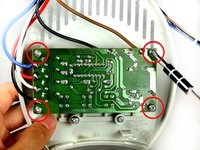
Remove the screws from the four corners of the circuit board.
-
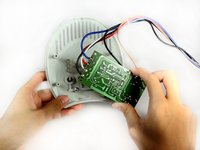
Remove the circuit board from the top cover.
-
-
-
-
-
Follow steps 1-4 to remove the front, back, and top covers of the fan to reach the fan blades.
-
Use a cloth to clean off dust clogged in between the fan blades.
-
-



To reassemble your device, follow these instructions in reverse order.
Cancel: I did not complete this guide.
One other person completed this guide.

Team

Cal Poly, Team 15-46, Forte Fall 2012 Member of Cal Poly, Team 15-46, Forte Fall 2012
CPSU-FORTE-F12S15G46
5 Members
72 Guides authored
