Free Shipping on Domestic Orders $75+

Chromo Noria Speaker Replacement

What you need

    1. Chromo Noria Speaker  Replacement, Back Panel: step 1, image 1 of 3 Chromo Noria Speaker  Replacement, Back Panel: step 1, image 2 of 3 Chromo Noria Speaker  Replacement, Back Panel: step 1, image 3 of 3
      • Insert your Plastic Opening Tool into the crease between the front panel and back panel.

      • Slide the Opening Tool around the entire device. As you progress, you should see the device open.

      Ask FixBot

      Add Comment

    2. Chromo Noria Speaker  Replacement: step 2, image 1 of 1
      • Carefully turn the device over.

      • Lay the back panel aside so you can see the device's parts.

      Ask FixBot

      Add Comment

    1. Chromo Noria Speaker  Replacement, Speaker: step 3, image 1 of 1
      • Using your spudger tool, remove speaker from the backboard.

      Ask FixBot

      Add Comment

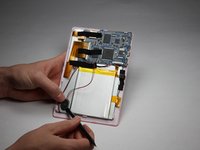
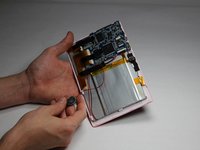
    2. Chromo Noria Speaker  Replacement: step 4, image 1 of 2 Chromo Noria Speaker  Replacement: step 4, image 2 of 2
      • Using the spudger tool, detach the speaker from the back of the screen.

      Ask FixBot

      Add Comment

    3. Chromo Noria Speaker  Replacement: step 5, image 1 of 1
      • Soldering irons get very hot! Be careful when handling one. If you'd like a tutorial on how to use one, click here.

      • Using a Soldering Iron, desolder both wires from the motherboard.

      Ask FixBot

      Add Comment

Conclusion

To reassemble your device, follow these instructions in reverse order.

Cancel: I did not complete this guide.

Ryan Rho

Member since: 10/31/16

201 Reputation

2 Guides authored

Team

Baylor, Team 5-6, Williams Fall 2016 Member of Baylor, Team 5-6, Williams Fall 2016

BU-WILLIAMS-F16S5G6

3 Members

72 Guides authored

0 Guide Comments

Add Comment

View Statistics:

Past 24 Hours: 1

Past 7 Days: 4

Past 30 Days: 24

All Time: 408