
Check Account Information.

redratchet21 and one other contributor
Last updated on Jul 7, 2026
Views: 368
View statistics:
- Past 24 Hours:
- 1
- Past 7 Days:
- 15
- Past 30 Days:
- 90
- All Time:
- 368
Comments: 0
No one has left comments on this guide. Will you be first?
Go to guide commentsCompleted: 0 1
No one has marked this guide "completed." Will you be the first?
1 person has marked this guide "completed." It's you — great job!
Favorites: 0 1
No one has favorited (and subscribed to) this guide. Will you be the first?
1 person has favorited (and subscribed to) this guide — and that's you!
Community-Contributed Guide
An awesome member of our community made this guide. It was not created by iFixit staff.
-
-
-
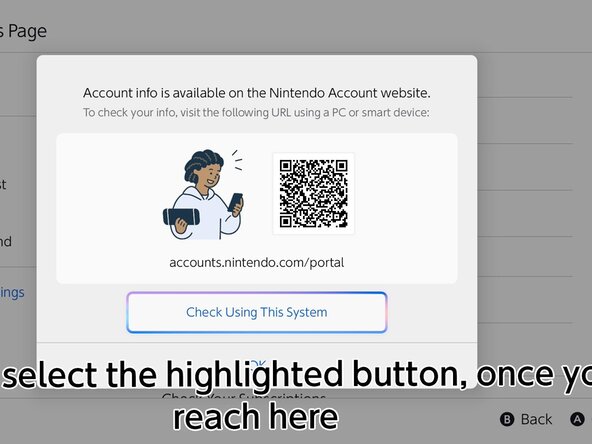
Go to the HOME menu, select your user page, then go to User Settings > Nintendo Account (your email) > Check Your Account Information, then click "Check Using This System"
 Ask FixBot
-
-
-
Sign in to your Nintendo Account using one of the following methods shown on the system.
-
-
-




Press B to end the portal.

