
Cen-Tech Seven Function Digital Multimeter Dial Replacement

Anna Kihm and 4 other contributors
Last updated on Jul 21, 2026
Views: 1.4K
View statistics:
- Past 24 Hours:
- 2
- Past 7 Days:
- 17
- Past 30 Days:
- 98
- All Time:
- 1,379
Comments: 0
No one has left comments on this guide. Will you be first?
Go to guide commentsCompleted: 1 2
1 person has marked this guide "completed." Will you be next?
2 people have marked this guide "completed." Including you — great job!
Favorites: 1 2
1 person has favorited (and subscribed to) this guide. Will you be next?
2 people have favorited (and subscribed to) this guide — including you!
Action Shots
Be an action hero! This guide needs images that better demonstrate how to perform specific actions.
Introduction
Go to step 1 ↓If the dial is stuck in any particular position it will be necessary to replace. This guide will show how to locate and replace the dial.
What you need


-
-
-
Place the meter face down, and the back panel and screws can be seen.
 Ask FixBot
-
-
-
Unscrew the two 9mm screws on the back panel using a #0 Phillips screwdriver.
-
-
-
Remove the back panel of the device by lifting upward.
-
Remove the battery from the meter before continuing.
-
-
-
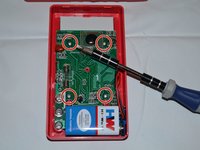
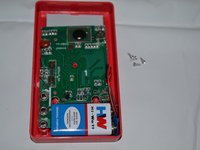
Remove the four 7mm Phillips screws holding the circuit board in place.
-
-
-
Gently lift the circuit board away from the device casing.
-
-
-
-
-
-
Carefully remove dial from device by lifting upward.
-
Clean existing dial or replace if necessary.
-




To reassemble your device, follow these instructions in reverse order.
Cancel: I did not complete this guide.
One other person completed this guide.

Team

Clemson, Team 2-4, Benson Fall 2014 Member of Clemson, Team 2-4, Benson Fall 2014
CLEM-BENSON-F14S2G4
4 Members
72 Guides authored
