
Casio WK-220 White Keys Replacement

Alexa and 4 other contributors
Last updated on Apr 11, 2017
Views: 2.2K
View statistics:
- Past 24 Hours:
- 2
- Past 7 Days:
- 18
- Past 30 Days:
- 98
- All Time:
- 2,206
Comments: 1
1 guide comment.
Go to guide commentsCompleted: 0 1
No one has marked this guide "completed." Will you be the first?
1 person has marked this guide "completed." It's you — great job!
Favorites: 0 1
No one has favorited (and subscribed to) this guide. Will you be the first?
1 person has favorited (and subscribed to) this guide — and that's you!
Introduction
Go to step 1 ↓This guide will show you how to remove, clean, and replace the black keys of the keyboard
What you need
Parts
Tools


-
-
-
Place device face-down
-
Remove 23 16mm screws with Phillips #2 screwdriver
 Ask FixBot
-
-
-
-
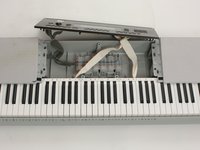
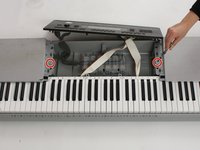
Remove speaker(s) if necessary to access desired key section(s)
-
Use Phillips #2 screwdriver to remove two 16 mm screws (circled in red)
-
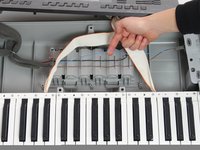
Pop wires out of plastic holders so speaker can be moved out of the way
-
Move speaker out of the way
-
-
-
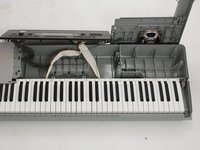
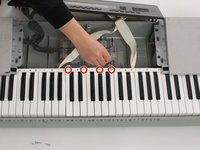
Remove 4 18 mm screws (circled in red) from desired key section using Philips #1 screwdriver
-
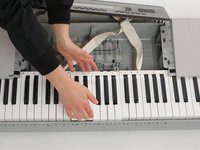
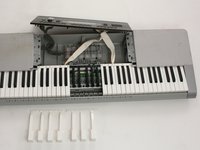
Gently push white keys away from screws and pull up to remove from keyboard. Repeat this with the black keys
-
Reassemble with new/cleaned keys
-
-







To reassemble your device, follow these instructions in reverse order.

Team

Cal Poly, Team 10-2, Banghart Winter 2017 Member of Cal Poly, Team 10-2, Banghart Winter 2017
CPSU-BANGHART-W17S10G2
4 Members
72 Guides authored
