
Casio SPF-40 2273 Battery Replacement

Acn0w and 4 other contributors
Last updated on Apr 22, 2025
Views: 14K
View statistics:
- Past 24 Hours:
- 3
- Past 7 Days:
- 28
- Past 30 Days:
- 206
- All Time:
- 14,104
Comments: 5
5 guide comments.
Go to guide commentsCompleted: 5 6
5 people have marked this guide "completed." Will you be next?
6 people have marked this guide "completed." Including you — great job!
Favorites: 0 1
No one has favorited (and subscribed to) this guide. Will you be the first?
1 person has favorited (and subscribed to) this guide — and that's you!
Featured Guide
This guide has been found to be exceptionally cool by the iFixit staff.
Community-Contributed Guide
An awesome member of our community made this guide. It was not created by iFixit staff.
Introduction
Go to step 1 ↓For this disassembly we will need a phillips screwdriver 1.5 and a pair of tweezers. Prepare a little container for screws: they are tiny!
What you need
Tools

-
-
-
This super strong Casio watch is more docile than waht you might think.
-
We don't need to twist off the front's screws.
-
It doesn't bite, so let's turn it around
 Ask FixBot
-
-
Tool used on this step:Tweezers$4.99
-
With the phillips screwdriver take off these four screws
-
Lift up an extremity of the watchstrap and remove the base.
-
You can use a flat screwdriver to help you
-
With the tweezers lift the white plastic cover
-
Be careful to not damage the golden springs!! So take your time
-
-
-
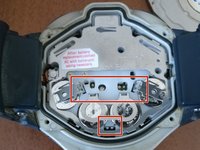
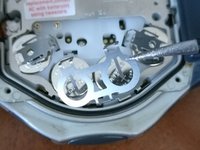
With the tip of the tweezers you have to unclip the clips into the red rectangles.
-
Just insert the tweezer's tip in the center of the bracket and pull toward the center of the watch
-
-
-
-
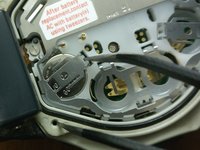
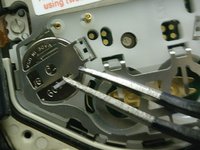
Extract the battery leveraging with the tweezers.
-
Keep attention to the golden springs again!
-
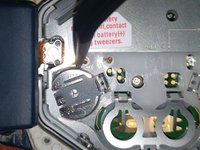
The clip, holding down the central batteries, completely removes
-
-




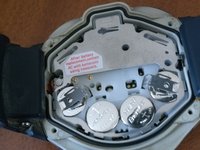
To reassemble your device, follow these instructions in reverse order.
Cancel: I did not complete this guide.
5 other people completed this guide.

5 Guide Comments
cannot see the “Golden Springs”. Where are they? Thank you
would be nice to have a description if the battery type, to buy before disassembling.. Thank you
mike
Come devo riavviare? Non si accende grazie
