
Casio MTD-120 Battery Replacement

Isabel Chavez and 4 other contributors
Last updated on May 7, 2024
Views: 5.8K
View statistics:
- Past 24 Hours:
- 6
- Past 7 Days:
- 23
- Past 30 Days:
- 98
- All Time:
- 5,750
Comments: 0
No one has left comments on this guide. Will you be first?
Go to guide commentsCompleted: 2 3
2 people have marked this guide "completed." Will you be next?
3 people have marked this guide "completed." Including you — great job!
Favorites: 0 1
No one has favorited (and subscribed to) this guide. Will you be the first?
1 person has favorited (and subscribed to) this guide — and that's you!
Introduction
Go to step 1 ↓If your Casio watch (MTD-120) has been losing time, showing incorrect time or stopping, it most likely has a dead or dysfunctional battery, which requires replacement.
A functional battery provides power to the watch such that the hands of the watch start functioning properly to show correct time.
What you need

-
-
Tool used on this step:Tweezers$4.99
-
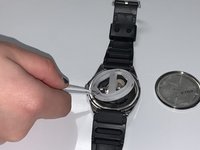
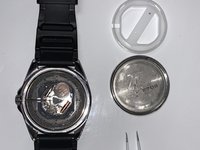
Remove the back cover of the watch with tweezers.
-
-
-
-
Place the plastic cover back over battery compartment.
-
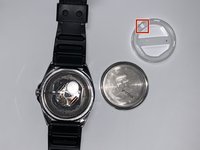
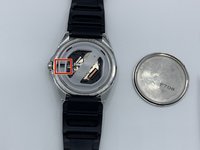
Align the marked area of the plastic cover with the crown of the watch.
-

 Ask FixBot





Follow the link provided in step 5 to find more information on recycling your old batteries.
Cancel: I did not complete this guide.
2 other people completed this guide.

Team

University of North Texas, Team S1-G1, Raign Spring 2020 Member of University of North Texas, Team S1-G1, Raign Spring 2020
UNT-RAIGN-S20S1G1
2 Members
12 Guides authored
