Free Shipping on Domestic Orders $75+

Casio G'zOne Commando Verizon MIL-SPEC Sim Card Replacement

What you need

  1. Casio G'zOne Commando Verizon MIL-SPEC Sim Card Replacement, Battery: step 1, image 1 of 1
    • Slide the slider on the back of the phone to the free position.

    Ask FixBot

    Add Comment

  2. Casio G'zOne Commando Verizon MIL-SPEC Sim Card Replacement: step 2, image 1 of 1
    • Using a plastic opening tool, gently lift open the back panel from bottom of the panel.

    Ask FixBot

    Add Comment

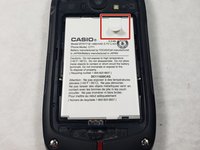
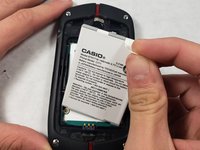
  3. Casio G'zOne Commando Verizon MIL-SPEC Sim Card Replacement: step 3, image 1 of 2 Casio G'zOne Commando Verizon MIL-SPEC Sim Card Replacement: step 3, image 2 of 2
    • Pull the white battery tab upwards and remove the battery.

    Ask FixBot

    Add Comment

  4. Casio G'zOne Commando Verizon MIL-SPEC Sim Card Replacement, Sim Card: step 4, image 1 of 1
    • Using a spudger, gently open the metal tab up. Now, it is ready for you to insert the new SIM card.

    Ask FixBot

    Add Comment

Conclusion

To reassemble your device, follow these instructions in reverse order.

Cancel: I did not complete this guide.

Zack Almeida

Member since: 10/24/18

392 Reputation

4 Guides authored

Team

1 Guide Comment

i believe that is the memory card, not the sim card!

Joshua Vaillancourt - Reply Share

Add Comment

View Statistics:

Past 24 Hours: 0

Past 7 Days: 7

Past 30 Days: 33

All Time: 2,887