Introduction
This guide demonstrates a step-by-step process on how to replace a CASIO FX-991MS battery. While the scientific calculator has a solar panel, the battery is still able to die after long usage, therefore it is necesary to understand how to replace it. Here you will learn how to quickly swap out the battery quickly and efficiently.
What you need
-
-
-
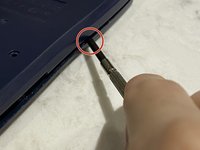
Use a Philips #0 head screwdriver to remove the five screws on the back of the device.
-
-


 Ask FixBot




To reassemble your device, follow these instructions in reverse order.
Cancel: I did not complete this guide.
14 other people completed this guide.

Team

York University, Team S1-G16, Melo-Thaiss Winter 2021 Member of York University, Team S1-G16, Melo-Thaiss Winter 2021
YORK-MELO-THAISS-W21S1G16
1 Member
12 Guides authored
