Introduction
The Canon SX40HS is a high-powered, user-friendly digital camera. The SX40 HS is a great entry-level camera that provides simplicity and quality at a low cost. Due to wear and tear, it is important to know how to change the flash cover. This guide is geared towards everyday photographers and professionals.
What you need
-
-
-
Extend the flash cover upwards and remove the 4 mm black screw located on the left side. You will need a Phillips #00 screwdriver to remove it.
-
Repeat to remove the 4 mm black screw located on the right side.
 Ask FixBot
-
-
-
-
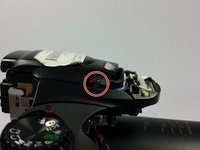
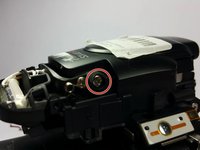
After removing the flash cover, remove the 6 mm silver screw on the right side with a Phillips #00 screwdriver.
-
Repeat to remove the 6 mm silver screw on the left side with a Phillips #00 screwdriver.
-
-
-
Replace the external flash cover or the internal flashlight when all 6 mm silver screws are out.
-
-



To reassemble your device, follow Steps 1-4 in reverse order.
Cancel: I did not complete this guide.
One other person completed this guide.

Team

UMass Dartmouth, Team 7-7, Cichon Spring 2015 Member of UMass Dartmouth, Team 7-7, Cichon Spring 2015
UMASSD-CICHON-S15S7G7
3 Members
36 Guides authored
2 Guide Comments
How to disconnect wires from front cover to remove it.
Has anyone tried to remove the front cover from their sx40?
Mine has a bundle of 4 wires going to some sensor below where the flash is. Looks like there’s a clear plastic sensor there but I can’t figure out how to disconnect them.
