Free Shipping on Domestic Orders $75+

Canon Powershot ELPH 100 HS Memory Card Replacement

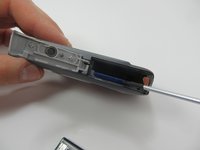
    1. Canon Powershot ELPH 100 HS Memory Card Replacement, Battery: step 1, image 1 of 3 Canon Powershot ELPH 100 HS Memory Card Replacement, Battery: step 1, image 2 of 3 Canon Powershot ELPH 100 HS Memory Card Replacement, Battery: step 1, image 3 of 3
      • Locate the battery cover on the bottom of your camera.

      • Slide the tab to the right to open the battery cover.

      Ask FixBot

      Add Comment

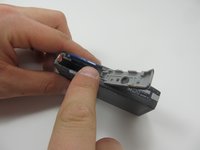
    2. Canon Powershot ELPH 100 HS Memory Card Replacement: step 2, image 1 of 2 Canon Powershot ELPH 100 HS Memory Card Replacement: step 2, image 2 of 2
      • Flip the battery cover open.

      • Using your fingers, slide the battery out of the camera.

      • This was not the original battery that came the camera, so yours may look different.

      Ask FixBot

      Add Comment

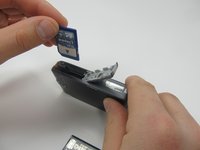
    1. Canon Powershot ELPH 100 HS Memory Card Replacement, Memory Card: step 3, image 1 of 3 Canon Powershot ELPH 100 HS Memory Card Replacement, Memory Card: step 3, image 2 of 3 Canon Powershot ELPH 100 HS Memory Card Replacement, Memory Card: step 3, image 3 of 3
      • Push down on the memory card until it clicks and releases.

      • Pull up on the memory card to remove it.

      Ask FixBot

      Add Comment

Conclusion

To reassemble your device, follow these instructions in reverse order.

Cancel: I did not complete this guide.

Lillia

Member since: 03/17/15

267 Reputation

2 Guides authored

Team

1 Guide Comment

my internal card reader hardware is not functional

can i replace it somehow

s l - Reply Share

Add Comment

View Statistics:

Past 24 Hours: 0

Past 7 Days: 5

Past 30 Days: 34

All Time: 1,621