Introduction
Problems with the Canon PowerShot SX600 HS camera may arise when there exists an issue with the battery, such as if its not working, placed improperly, or missing. In the guide it will show how you can replace the battery.
-
-
-
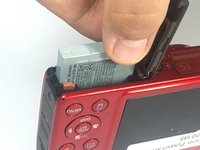
To remove the battery, locate the battery cover on the bottom of the camera.
-
Using your thumb, press down on the cover and slide it outwards.
 Ask FixBot
-
-
-


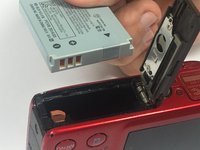
To reassemble your device, follow these instructions in reverse order.
Cancel: I did not complete this guide.
2 other people completed this guide.

Team

USF Tampa, Team S6-G4, Lacy Spring 2017 Member of USF Tampa, Team S6-G4, Lacy Spring 2017
USFT-LACY-S17S6G4
3 Members
72 Guides authored
