Free Shipping on Domestic Orders $75+

Canon PowerShot SX50 HS Flash Bulb Replacement

What you need

  1. Canon PowerShot SX50 HS Flash Bulb Replacement, Battery: step 1, image 1 of 1
    • Locate the battery compartment on the bottom of the camera.

    • Push the latch on the outside of the battery door to the right to get to the battery pack inside.

    Ask FixBot

    Add Comment

  2. Canon PowerShot SX50 HS Flash Bulb Replacement: step 2, image 1 of 1
    • Pull the brown latch on the inside of the battery door towards your palm (to the left). The battery pack should pop out (battery not pictured).

    • Now remove the battery pack from the camera with your fingers.

    Ask FixBot

    Add Comment

  3. Canon PowerShot SX50 HS Flash Bulb Replacement, Flash Bulb: step 3, image 1 of 1
    • Lift up the flash as you would when using and activating the flash.

    Ask FixBot

    Add Comment

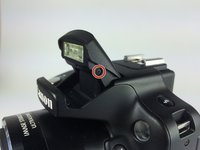
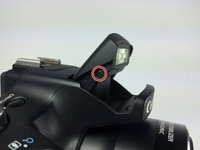
  4. Canon PowerShot SX50 HS Flash Bulb Replacement: step 4, image 1 of 2 Canon PowerShot SX50 HS Flash Bulb Replacement: step 4, image 2 of 2
    • Remove the two Phillips #000 screws, length 3 mm, on both sides of the flash.

    Ask FixBot

    Add Comment

  5. Canon PowerShot SX50 HS Flash Bulb Replacement: step 5, image 1 of 1
    • Pull off the back encasement of the flash with your fingers. The internals will now become visible.

    Ask FixBot

    Add Comment

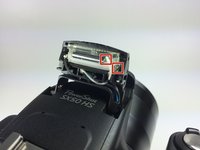
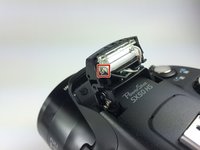
  6. Canon PowerShot SX50 HS Flash Bulb Replacement: step 6, image 1 of 2 Canon PowerShot SX50 HS Flash Bulb Replacement: step 6, image 2 of 2
    • Locate the black, white and the beige wires. Desolder these wires at the point of connection with the bulb.

    • See the guide on this link for soldering and desoldering.

    Ask FixBot

    Add Comment

  7. Canon PowerShot SX50 HS Flash Bulb Replacement: step 7, image 1 of 3 Canon PowerShot SX50 HS Flash Bulb Replacement: step 7, image 2 of 3 Canon PowerShot SX50 HS Flash Bulb Replacement: step 7, image 3 of 3
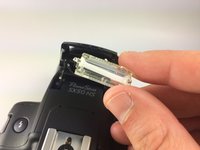
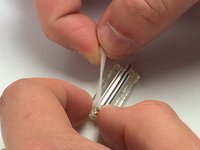
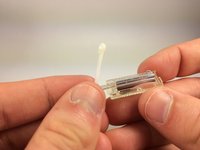
    • Once the wires have been desoldered, pull the flash out of its casing.

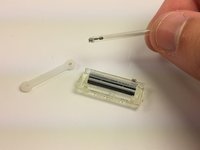
    • Remove one end of the rubber band holding the bulb in place.

    • Slide the bulb out of the flash.

    Ask FixBot

    Add Comment

  8. Canon PowerShot SX50 HS Flash Bulb Replacement: step 8, image 1 of 2 Canon PowerShot SX50 HS Flash Bulb Replacement: step 8, image 2 of 2
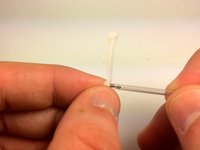
    • Completely remove the rubber band from the flash bulb.

    Ask FixBot

    Add Comment

Conclusion

To reassemble your device, follow these instructions in reverse order.

Cancel: I did not complete this guide.

2 other people completed this guide.

Daniel Gurrola

Member since: 04/01/15

273 Reputation

2 Guides authored

Team

Cal Poly, Team 12-7, Lancaster Spring 2015 Member of Cal Poly, Team 12-7, Lancaster Spring 2015

CPSU-LANCASTER-S15S12G7

5 Members

10 Guides authored

5 Guide Comments

Hello! excellent explanation . Thank you very much! I have a question : could you tell me where I can buy the replacement lamp ? I already tried searching online but can not find anywhere that sells it. Thank you very much , greetings !

German Witt - Reply Share

I need a bulb, no one can tell where you can find a bulb, and it says no parts needed. that's stupid since you need a replacement bulb that you can't find. without it all this is useless.

buborek1974 - Reply Share

Where can i found the replacement bulb???Why it is written that there is no need for replacement parts?

Audrey - Reply Share

Do you know where I can purchase a bulb to go with this type of camera? I can not find just the bulb. Please HELP!

arusso4e - Reply Share

Hi, i need know if this piece is the correct


https://es.aliexpress.com/item/328403224...

Thanks


Fredy Cardenas Bolaños - Reply Share

Add Comment

View Statistics:

Past 24 Hours: 0

Past 7 Days: 13

Past 30 Days: 58

All Time: 6,567