Introduction
This guide provides a breakdown that shows how to replace the function wheel on your Canon PowerShot SX160 IS by disassembling a portion of the camera to access the function wheel.
What you need
-
-
-
Unscrew the 2-4.8mm black Phillips head screws from the front of the camera using a #0 Phillips screwdriver.
-
Unscrew the 2-4.8mm black Phillips head screws from the side of the camera using a #0 Phillips screwdriver.
-
Unscrew the 3-4.8mm black Phillips head screws from the bottom of the camera using a #0 Phillips screwdriver.
 Ask FixBot
-
-
-
Using your hands, gently separate the back panel from the camera.
-
Continue to pull the back panel until it completely detaches from the camera.
-
-
-
-
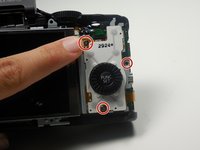
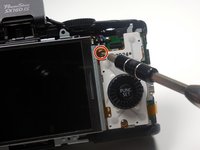
Use a #0 phillips screwdriver to unscrew the 3-3.75mm silver Phillips head screws from the function wheel panel of the camera.
-
-



Congratulations, you have successfully replaced your function wheel. To reassemble your device, follow these instructions in reverse order.

Team

Colorado Springs, Team 2-3, Panko Spring 2015 Member of Colorado Springs, Team 2-3, Panko Spring 2015
UCCS-PANKO-S15S2G3
3 Members
72 Guides authored
1 Guide Comment
Hi, I replaced the LCD screen but now my function wheel and panel don’t work. I think the ribbon got disconnected , but I can’t figure out where to attach it. Can you help?
