
Canon PowerShot SD30 Control Panel Replacement

Diego Hughes and
Last updated on May 7, 2024
Views: 795
View statistics:
- Past 24 Hours:
- 3
- Past 7 Days:
- 10
- Past 30 Days:
- 67
- All Time:
- 795
Comments: 0
No one has left comments on this guide. Will you be first?
Go to guide commentsCompleted: 2 3
2 people have marked this guide "completed." Will you be next?
3 people have marked this guide "completed." Including you — great job!
Favorites: 0 1
No one has favorited (and subscribed to) this guide. Will you be the first?
1 person has favorited (and subscribed to) this guide — and that's you!
Featured Student Guide
This guide has been the hard work of our awesome students and is found to be exceptionally cool by the iFixit staff.
What you need
Tools


Introduction
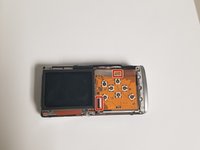
Go to step 1 ↓Use this guide to replace the control panel in your camera.
-
-
-
Remove the two 2mm black screws that are located on the underside of the camera.
-
Remove the two 3mm silver screws from the right side of camera.
 Ask FixBot
-
-
-
-
-
Remove the 2mm screw from the back of the camera.
-
Remove two 2mm screws from the bottom of the camera.
-
Remove two 2mm screws the left side of camera.
-
-
-
-
-
Tool used on this step:Tweezers$4.99
-
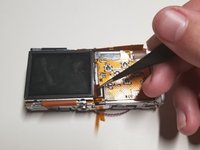
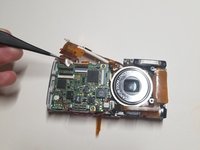
Use the tweezers to pull up on the piece of black plastic connected to the ribbon to unhook and remove the ribbon connected to the screen.
-
-
-
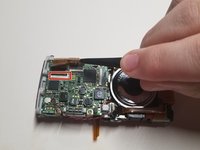
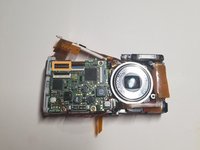
Turn the camera over to the side with the lens and remove the ribbon on the left side.
-
After removing the ribbon there will be a second ribbon to remove that was hiding underneath the first ribbon.
-
-
-
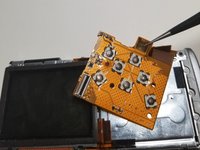
Lift up the button that connects to the power button of the camera so you can remove the control panel.
-
-






To reassemble your device, follow these instructions in reverse order.
Cancel: I did not complete this guide.
2 other people completed this guide.

Team

University of North Texas, Team S5-G3, Thompson Fall 2018 Member of University of North Texas, Team S5-G3, Thompson Fall 2018
UNT-THOMPSON-F18S5G3
4 Members
60 Guides authored
