
Canon PowerShot SD1200 IS LCD Replacement

Jeff Casper and 5 other contributors
Last updated on May 7, 2024
Views: 1.4K
View statistics:
- Past 24 Hours:
- 2
- Past 7 Days:
- 20
- Past 30 Days:
- 83
- All Time:
- 1,371
Comments: 2
1 comment on steps, 1 guide comment.
Go to guide commentsCompleted: 2 3
2 people have marked this guide "completed." Will you be next?
3 people have marked this guide "completed." Including you — great job!
Favorites: 0 1
No one has favorited (and subscribed to) this guide. Will you be the first?
1 person has favorited (and subscribed to) this guide — and that's you!
Slice and Dice
The steps in this guide should be split up and made into a series of prerequisite guides.
Introduction
Go to step 1 ↓Removing the LCD screen seems intimidating, but everything comes apart rather easily. You just have to lift tabs, remove a single screw and lift out the screen.
What you need
Tools
-
-
Spudger4.9


-
-
-
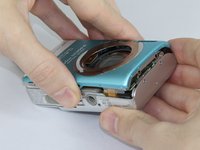
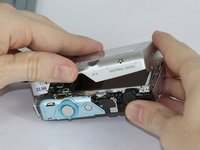
Remove the two screws from the side of the camera casing with the strap. (4mm Phillips 00)
-
Remove the two screws from the bottom of the camera. (4mm Phillips 00)
-
Remove the two screws from the right side of the camera opposite the strap. (2mm Phillips 00)
-
-
-
-
Tool used on this step:Tweezers$4.99
-
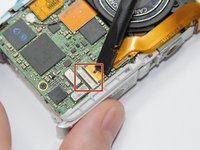
Use the spudger to lift the retaining flap on the Zero Insertion Force (ZIF) tab securing the thick ribbon cable.
-
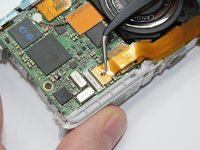
Slide out the ribbon cable using fingers or tweezers.
-
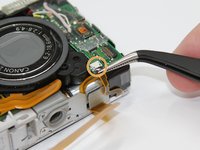
Using tweezers, disconnect the small ribbon cable below the flash assembly from the No Fuss Connector by simply pulling the ribbon cable straight out.
-
-
-
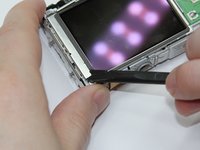
Remove the L shaped brackets from the left and right side of the LCD screen with the spudger tool.
-
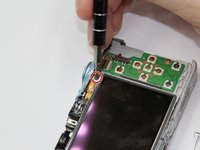
Remove the screw below the shutter button. (2.5mm Phillips 00)
-
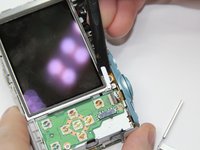
Holding the sides of the LCD screen, lift the screen up and away to remove.
-
-

 Ask FixBot






To reassemble your device, follow these instructions in reverse order.
Cancel: I did not complete this guide.
2 other people completed this guide.

Team

USF Tampa, Team 17-5, Blackwell Fall 2016 Member of USF Tampa, Team 17-5, Blackwell Fall 2016
USFT-BLACKWELL-F16S17G5
3 Members
84 Guides authored
1 Guide Comment
Hello do you guys sello the LCD screen and do you ship to México.
