
Canon PowerShot S400 Shutter Button Assembly Replacement

Ross Bryan and 5 other contributors
Last updated on Jan 28, 2014
Views: 3.2K
View statistics:
- Past 24 Hours:
- 2
- Past 7 Days:
- 17
- Past 30 Days:
- 98
- All Time:
- 3,241
Comments: 0
No one has left comments on this guide. Will you be first?
Go to guide commentsCompleted: 0 1
No one has marked this guide "completed." Will you be the first?
1 person has marked this guide "completed." It's you — great job!
Favorites: 1 2
1 person has favorited (and subscribed to) this guide. Will you be next?
2 people have favorited (and subscribed to) this guide — including you!
Introduction
Go to step 1 ↓This guide provides instructions on how to replace the shutter button assembly on the Canon PowerShot S400.
What you need
Tools
-
Spudger4.9


-
-
-
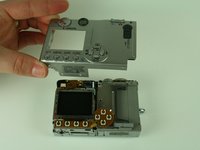
Remove the 4.75mm screw located in the top right corner of the backside of the camera.
-
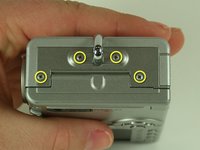
Remove the four # screws located on the bottom of the camera.
 Ask FixBot
-
-
-
Remove the two screws located on the right side of the camera.(the side with the USB adaption plug)
-
Remove the four screws on the left side of the camera.
-
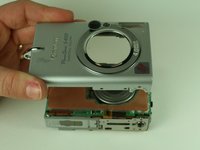
This will release a small metal plate. Remove this plate.
-
-
-
-
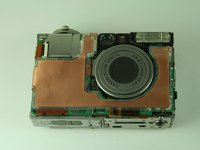
Using a spudger, carefully pry the shutter button assembly from the camera.
-
Install the replacement shutter button assembly.
-
-





To reassemble your device, follow these instructions in reverse order.

Team

Cal Poly, Team 5-19, Amido Winter 2011 Member of Cal Poly, Team 5-19, Amido Winter 2011
CPSU-AMIDO-W11S5G19
4 Members
72 Guides authored
