
Canon PowerShot ELPH 300HS Camera Case Replacement

Kathryn Van Susante and 6 other contributors
Last updated on Jan 15, 2026
Views: 1.7K
View statistics:
- Past 24 Hours:
- 1
- Past 7 Days:
- 17
- Past 30 Days:
- 109
- All Time:
- 1,726
Comments: 1
1 comment on steps.
Completed: 1 2
1 person has marked this guide "completed." Will you be next?
2 people have marked this guide "completed." Including you — great job!
Favorites: 1 2
1 person has favorited (and subscribed to) this guide. Will you be next?
2 people have favorited (and subscribed to) this guide — including you!
Action Shots
Be an action hero! This guide needs images that better demonstrate how to perform specific actions.
Needs Better Images
Better photos will improve this guide. Help out by taking, editing, or uploading new ones!
Markup Mishap
This guide needs better markups. Help out by correcting or making some markup annotations.
Introduction
Go to step 1 ↓Before you begin, make sure that you are in a relatively dust free environment with adequate space for the project. This guide involves lot of small screws, so it will also be helpful to have some way to keep track of them as well.
What you need


-
-
-
Turn off your camera.
-
Remove the battery to prevent risk of shock.
 Ask FixBot
-
-
-
Turn off your camera by pressing the power button, located on the top-center of the device.
-
Locate the battery door on the bottom right area of the camera case.
-
Place your finger firmly on the black rubber pad on the battery door and slide the door to the right to open it.
-
Locate the orange battery release button beneath the battery door.
-
Slide the battery release button downward to release the battery.
-
-
-
Remove the two screws located on the left side of the camera case, using the Phillips screwdriver #00 (2.0 mm).
-
-
-
Remove the two screws on the bottom of the camera located near the battery door (Phillips #00 screwdriver) (4.0 mm).
-
-
-
Remove the screw located on the lower right side of the camera case (Phillips #00 screwdriver) (4.0 mm).
-
Remove the HDMI A/V out port cover located on the upper right side of the camera.
-
Remove the screw located just beneath the port cover removed in step 2. (Phillips #00 screwdriver) (2.0 mm).
-
-
-
-
Remove the back portion of the camera case to reveal the screw located on the top of the case.
-
Remove the screw from the top of camera case, located next to the shutter button (Phillips #00 screwdriver) (1.5 mm).
-
-
-
Carefully pry the case apart at the seem, using your fingers.
-
-


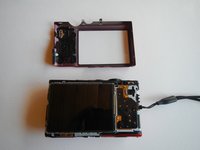
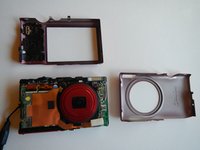
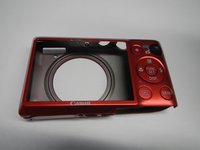
To reassemble your device, follow these instructions in reverse order.
Cancel: I did not complete this guide.
One other person completed this guide.

Team

Michigan Tech, Team 5-6, Lauer Spring 2014 Member of Michigan Tech, Team 5-6, Lauer Spring 2014
MTU-LAUER-S14S5G6
3 Members
72 Guides authored
