Free Shipping on Domestic Orders $75+

Canon PowerShot A630 Battery Door Replacement

What you need

  1. Canon PowerShot A630 Battery Door Replacement, Front Panel: step 1, image 1 of 2 Canon PowerShot A630 Battery Door Replacement, Front Panel: step 1, image 2 of 2
    • Open the battery door by sliding the tab on the battery door while pushing the battery door away from the camera.

    • Remove batteries.

    Ask FixBot

    Add Comment

  2. Canon PowerShot A630 Battery Door Replacement: step 2, image 1 of 2 Canon PowerShot A630 Battery Door Replacement: step 2, image 2 of 2
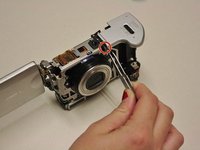
    • Remove the three indicated .2mm screws using a Phillips #00 screwdriver.

    • Gently pull off side-panel to remove it.

    Ask FixBot

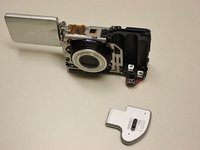
    Add Comment

  3. Canon PowerShot A630 Battery Door Replacement: step 3, image 1 of 1
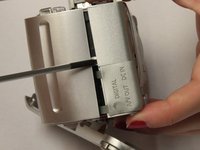
    • Remove the two indicated .2mm screws using a Phillips #00 screwdriver.

    Ask FixBot

    Add Comment

  4. Canon PowerShot A630 Battery Door Replacement: step 4, image 1 of 2 Canon PowerShot A630 Battery Door Replacement: step 4, image 2 of 2
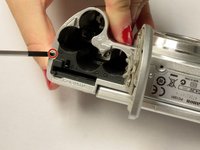
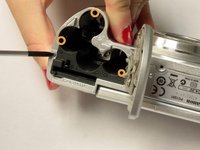
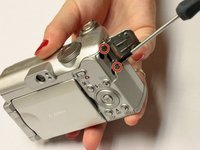
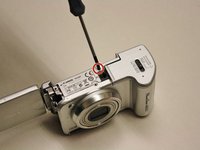
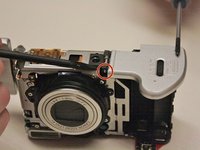
    • Remove the indicated .2mm screw using a Phillips #00 screwdriver.

    • Remove the three .2mm screws located on the internal side of the top panel within the battery chamber using a Phillips #00 screwdriver.

    Ask FixBot

    Add Comment

  5. Canon PowerShot A630 Battery Door Replacement: step 5, image 1 of 2 Canon PowerShot A630 Battery Door Replacement: step 5, image 2 of 2
    • Open 'DIGITAL A/V OUT' door on camera.

    • Remove the two indicated .2mm screws using a Phillips #00 screwdriver.

    Ask FixBot

    Add Comment

  6. Canon PowerShot A630 Battery Door Replacement: step 6, image 1 of 1
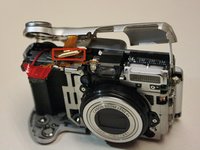
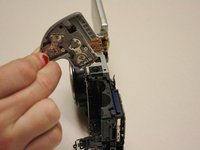
    • Grip the sides of the top panel and gently pull to separate the top panel from the camera body.

    • The top panel will not completely detach.

    Ask FixBot

    Add Comment

  7. Canon PowerShot A630 Battery Door Replacement: step 7, image 1 of 2 Canon PowerShot A630 Battery Door Replacement: step 7, image 2 of 2
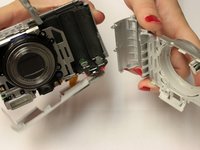
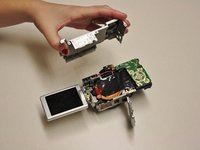
    • Gently pull the front and back panels apart, and use a Phillips #00 screwdriver to remove the screw connecting the panels.

    • Gripping the top and bottom, gently pull the front panel away from the camera body to remove it.

    Ask FixBot

    Add Comment

  8. Canon PowerShot A630 Battery Door Replacement, Back Panel: step 8, image 1 of 2 Canon PowerShot A630 Battery Door Replacement, Back Panel: step 8, image 2 of 2
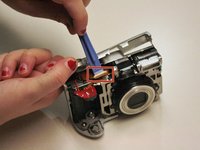
    • Use the spudger to gently pull back the retaining clip and pull the ribbon out.

    • The top panel should now be completely detached from the camera.

    • Applying too much force to the spudger may damage the retaining clip.

    Ask FixBot

    Add Comment

  9. Canon PowerShot A630 Battery Door Replacement: step 9, image 1 of 2 Canon PowerShot A630 Battery Door Replacement: step 9, image 2 of 2
    • Remove .2 mm screw using a #00 Philips screwdriver.

    • Gently pry off back panel to remove it.

    Ask FixBot

    Add Comment

  10. Canon PowerShot A630 Battery Door Replacement, Battery Door: step 10, image 1 of 1
    • Remover .2 mm screw using a #00 Philips screwdriver.

    Ask FixBot

    Add Comment

  11. Canon PowerShot A630 Battery Door Replacement: step 11, image 1 of 2 Canon PowerShot A630 Battery Door Replacement: step 11, image 2 of 2
    Tool used on this step:
    Tweezers
    $4.99
    Buy
    • Using tweezers, gently pull remove the small rod in the battery door hinge.

    Ask FixBot

    Add Comment

  12. Canon PowerShot A630 Battery Door Replacement: step 12, image 1 of 2 Canon PowerShot A630 Battery Door Replacement: step 12, image 2 of 2
    • Gently pull up on the battery door to remove it.

    Ask FixBot

    Add Comment

Conclusion

To reassemble your device, follow these instructions in reverse order.

Cancel: I did not complete this guide.

3 other people completed this guide.

Alicia Burns

Member since: 10/13/14

645 Reputation

5 Guides authored

Team

Clemson, Team 2-5, Benson Fall 2014 Member of Clemson, Team 2-5, Benson Fall 2014

CLEM-BENSON-F14S2G5

4 Members

18 Guides authored

0 Guide Comments

Add Comment

View Statistics:

Past 24 Hours: 1

Past 7 Days: 10

Past 30 Days: 59

All Time: 2,470