Free Shipping on Domestic Orders $75+

Canon PowerShot A3400 IS Plastic Case Replacement

What you need

  1. Canon PowerShot A3400 IS Plastic Case Replacement, Battery: step 1, image 1 of 1
    • Place thumb on area right next to where it says open and slide to the right to open.

    Ask FixBot
  2. Canon PowerShot A3400 IS Plastic Case Replacement: step 2, image 1 of 1
    • Remove the battery by pushing the orange object outwards; the battery will spring up and out.

    Ask FixBot
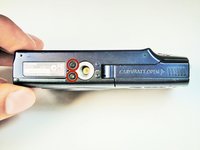
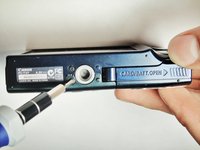
  3. Canon PowerShot A3400 IS Plastic Case Replacement, Plastic Case: step 3, image 1 of 2 Canon PowerShot A3400 IS Plastic Case Replacement, Plastic Case: step 3, image 2 of 2
    • Remove the two 5.00 mm screws in the bottom of the casing with a Philips #000 screwdriver

    Ask FixBot
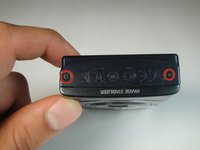
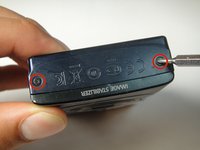
  4. Canon PowerShot A3400 IS Plastic Case Replacement: step 4, image 1 of 2 Canon PowerShot A3400 IS Plastic Case Replacement: step 4, image 2 of 2
    • Place the camera on to the side that has the image stabilizer label.

    • Remove the 5.00 mm screws that are on this side using the screwdriver.

    Ask FixBot
  5. Canon PowerShot A3400 IS Plastic Case Replacement: step 5, image 1 of 1
    • Place camera on to the side with the A/V Out Digital Cover facing up.

    • Remove this visible 5.00 mm screw.

    • Pull the A/V Out Digital cover back to uncover the next step.

    Ask FixBot
  6. Canon PowerShot A3400 IS Plastic Case Replacement: step 6, image 1 of 1
    • Remove the 5.00 mm screw from behind the cover.

    Ask FixBot
  7. Canon PowerShot A3400 IS Plastic Case Replacement: step 7, image 1 of 1
    • Make sure the battery cover is open.

    Ask FixBot
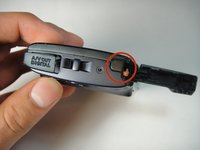
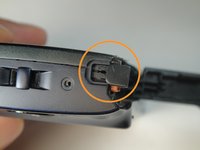
  8. Canon PowerShot A3400 IS Plastic Case Replacement: step 8, image 1 of 2 Canon PowerShot A3400 IS Plastic Case Replacement: step 8, image 2 of 2
    • Turn the camera onto the side with the A/V out Digital cover.

    • Use your finger to pull this tab to the right.

    Ask FixBot
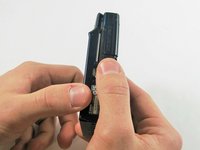
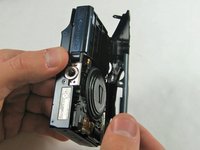
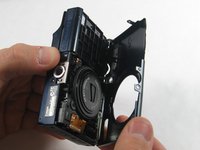
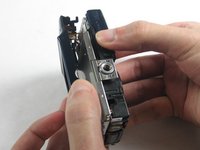
  9. Canon PowerShot A3400 IS Plastic Case Replacement: step 9, image 1 of 3 Canon PowerShot A3400 IS Plastic Case Replacement: step 9, image 2 of 3 Canon PowerShot A3400 IS Plastic Case Replacement: step 9, image 3 of 3
    • Remove the lens side by using your fingers or a spudger to pry it gently open.

    • Try to pry it loose all around that side so that it is easier to pull off.

    Ask FixBot
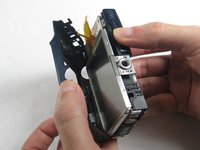
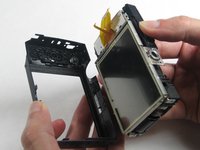
  10. Canon PowerShot A3400 IS Plastic Case Replacement: step 10, image 1 of 3 Canon PowerShot A3400 IS Plastic Case Replacement: step 10, image 2 of 3 Canon PowerShot A3400 IS Plastic Case Replacement: step 10, image 3 of 3
    • Using your fingers, pull the screen side gently off.

    • Try to loosen it all around that side so that it is easier to try and pull it off.

    Ask FixBot
Conclusion

To reassemble your device, follow these instructions in reverse order.

One other person completed this guide.

Emily Pretorius

Member since: 01/13/15

349 Reputation

3 Guides authored

0 Guide Comments

Add Comment

View Statistics:

Past 24 Hours: 0

Past 7 Days: 7

Past 30 Days: 46

All Time: 545