
Canon PowerShot A2300 Front Cover Replacement

Ashley Fincher and 3 other contributors
Last updated on Jun 22, 2015
Views: 1.4K
View statistics:
- Past 24 Hours:
- 2
- Past 7 Days:
- 15
- Past 30 Days:
- 92
- All Time:
- 1,444
Comments: 1
1 guide comment.
Go to guide commentsCompleted: 1 2
1 person has marked this guide "completed." Will you be next?
2 people have marked this guide "completed." Including you — great job!
Favorites: 0 1
No one has favorited (and subscribed to) this guide. Will you be the first?
1 person has favorited (and subscribed to) this guide — and that's you!
Introduction
Go to step 1 ↓This guide will walk the reader through the process of removing the front cover in order to replace it. There are no prerequisite guides that need to completed in order to remove the front cover.
What you need
Tools
-
Spudger4.9


-
-
-
Open the A/V Out Digital port cover on the function button side to reveal a screw.
 Ask FixBot
-
-
-
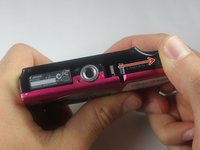
Open the card/battery latch by sliding the cover away from the camera in the direction indicated by the arrow.
-
-
-
-
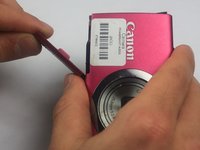
Pull the top of the front cover away from the camera by gripping the top of the front cover by the corners where the cover is still attached to the body.
-
-




To reassemble your device, follow these instructions in reverse order.
Cancel: I did not complete this guide.
One other person completed this guide.

Team

Baylor, Team 7-14, Williams Spring 2015 Member of Baylor, Team 7-14, Williams Spring 2015
BU-WILLIAMS-S15S7G14
4 Members
60 Guides authored
