Introduction
Replacing the grip on your camera may be necessary at some point due to wear and tear. This is not a necessary replacement, but makes handling the camera easier and more comfortable.
The Phillips #000 screwdriver is marked as an optional tool as you can always use the JIS #000 screwdriver in its place (JIS screwdrivers won't damage Phillips head screws).
What you need
-
-
Place the camera upside down, and position it to where the back of the camera is visible.
 Ask FixBot
-
-
-
To remove the secondary battery, reposition the camera to where the display screen is facing upwards.
-
Place your finger inside the empty battery compartment and pull away from the camera on the ridged battery tab.
-
-
-
Place the camera on its side with the soft touch grip facing up and the top of the camera facing right.
-
-
-
Slide the memory card door in the direction of the arrow engraved on the camera.
-
Once the door has slid open to its full position, lift up on the door.
-
-
-
With the door open, push down the small black plunger next to the CF slot. The CF card will disengage from the slot and be ejected far enough that you can grasp it between thumb and forefinger and remove it from the slot.
-
-
-
-
Remove the three black M3x4mm JIS #000 screws on the bottom of the camera.
-
-
-
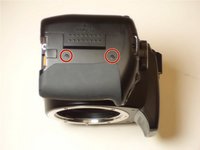
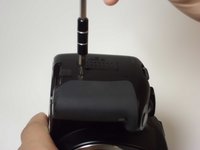
Remove the two black M3x6mm JIS #000 screws from the right side of the camera.
-
-
-
Remove the two M3x5mm JIS #000 screws on the side of the camera opposite to the hand grip.
-
-
-
Remove the following screws located in the memory card slot:
-
Two M3x2mm JIS #000 screws
-
-
-
Gently pry off the back casing.
-
Use a spudger to lift the tab on the ribbon cable's ZIF connector.
-
Gently pull the ribbon cable out of the connector.
-
-
-
Remove the following screws from the bottom of the camera:
-
Two M3x4.5mm JIS #000 screws
-
One M3x3mm JIS #000 screw
-
-
-
Remove the following screws from the front of the camera:
-
Two M3x6mm JIS #000 screws
-
-
-
Remove the grip from the front casing by simply pulling on it and releasing the pins which hold it in place.
-




To reassemble your device, follow these instructions in reverse order.

Team

USF Tampa, Team 8-6, Eyestone Fall 2015 Member of USF Tampa, Team 8-6, Eyestone Fall 2015
USFT-EYESTONE-F15S8G6
3 Members
18 Guides authored
