Introduction
This is a necessary procedure for replacing the lens of the Canon EOS Rebel XS 35mm camera, which is located on the back of the camera, near the top. This guide details how to remove the lens and put a lens back on, whether it's the same lens now fixed, or a new one.
What you need
-
-
Using a PH000 screwdriver bit, remove the three black screws shown in the two pictures that are all 4 mm in length and 1 mm in diameter.
 Ask FixBot
-
-
-
Using a Phillips #000 screwdriver, remove the two black screws shown in the picture that are both 6 mm in length and 1.25 mm in diameter.
-
-
-
-
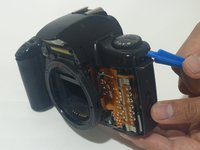
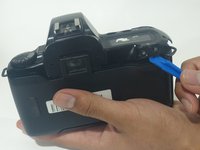
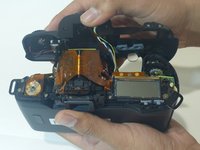
Using an opening tool (you can also use your nails, but try not to use something potentially damaging to the camera such as metal), separate the top cover from the rest of the camera!
-
-
-
Using a PH000 screwdriver bit, remove the 2 black screws circled in the picture, which are both 8 mm in length and 1.5 mm in diameter.
-




To reassemble your device, follow these instructions in reverse order.

