
Canon EOS 70D LCD Touchscreen Replacement

Last updated on Oct 17, 2025
Views: 8.6K
View statistics:
- Past 24 Hours:
- 6
- Past 7 Days:
- 24
- Past 30 Days:
- 118
- All Time:
- 8,565
Comments: 8
2 comments on steps, 6 guide comments.
Go to guide commentsCompleted: 10 11
10 people have marked this guide "completed." Will you be next?
11 people have marked this guide "completed." Including you — great job!
Favorites: 0 1
No one has favorited (and subscribed to) this guide. Will you be the first?
1 person has favorited (and subscribed to) this guide — and that's you!
Introduction
Go to step 1 ↓The LCD Touchscreen operation allows the user to view pictures that were taken as well as scroll through the many options the Canon EOS 70D camera has to offer.
What you need
Tools
-
Spudger4.9


-
-
-
Hold the camera with the lens pointing down. Press the highlighted button with your finger to release the cover.
-
Pull cover over to expose the battery.
 Ask FixBot
-
-
-
Press the white button with your finger to release the battery.
-
Once released, the battery will eject out about two inches
-
-
-
-
-
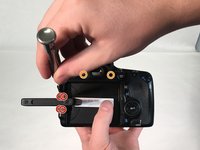
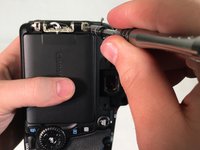
Pull Touchscreen out and rotate 90 degrees. Remove the four 3 mm Phillips #000 head screws that are now exposed at the hinge.
-
Remove the two 5 mm Phillips #000 head screws that near the viewfinder.
-
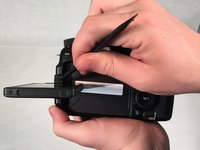
Use a spudger and pry apart the two plastic hinge-covers surrounding the screen hinge.
-
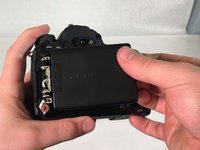
Rotate the screen forward 90 degrees and push it back into its housing against the camera.
-
-
-
-
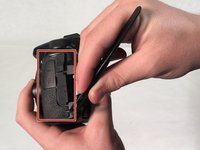
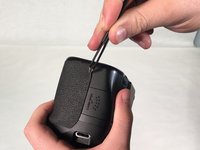
Use a spudger to peel rubber matting on left hand side to expose camera backplate mounting screws.
-
Remove three 4 mm Phillip #000 head screws that mount the backplate to the left side of camera.
-
-
Tool used on this step:Tweezers$4.99
-
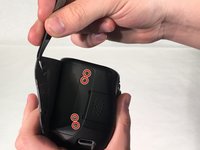
Use tweezers to pry rubber matting on right hand side to expose backplate mounting screws.
-
Remove four 4 mm Phillips #000 head screws that mount the backplate to the right side of camera.
-
-
-
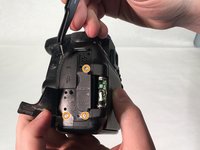
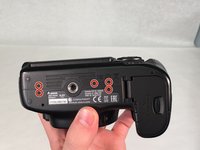
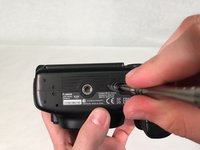
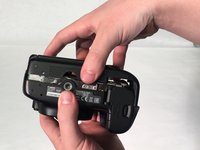
Turn camera upside down. Remove five 5 mm Phillips #000 head screws securing the backplate to the bottom of the camera.
-
Grab the backplate and gently pull away from camera.
-
-
-
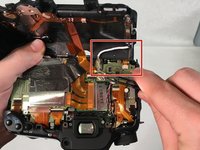
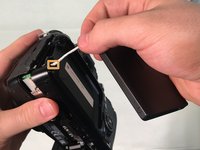
Carefully pry open backplate from camera to expose LCD connector (white wire). LCD connector is attached with a metal bar to the motherboard.
-
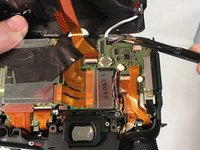
Use tweezers to gently pry metal bar connector from camera motherboard.
-
-
-
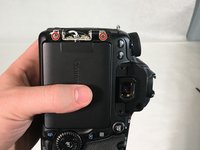
Remove two 4 mm Phillips #000 head screws that mount the LCD touchscreen to the hinge on the camera.
-
-
-
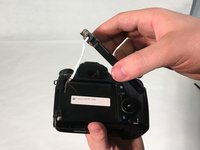
Grip the screen with your hand and gently pull white connecting wire through hole in backplate.
-
Once the connector reaches the hole, twist the connector and pull completely through hole.
-
-














To reassemble your device, follow these instructions in reverse order.
Cancel: I did not complete this guide.
10 other people completed this guide.

Team

University of Memphis, Team S2-G5, Kim Spring 2018 Member of University of Memphis, Team S2-G5, Kim Spring 2018
UM-KIM-S18S2G5
3 Members
60 Guides authored
6 Guide Comments
Would this also apply to the 80D, given they’re so similar? Also, is it still possible to stick the rubber bits back down so that they are exactly the same as before?
