
Canon EOS 5D Mark IV Interface Cover Replacement

Zephosk and one other contributor
Last updated on Jul 8, 2026
Views: 420
View statistics:
- Past 24 Hours:
- 3
- Past 7 Days:
- 28
- Past 30 Days:
- 129
- All Time:
- 420
Comments: 0
No one has left comments on this guide. Will you be first?
Go to guide commentsCompleted: 0 1
No one has marked this guide "completed." Will you be the first?
1 person has marked this guide "completed." It's you — great job!
Favorites: 0 1
No one has favorited (and subscribed to) this guide. Will you be the first?
1 person has favorited (and subscribed to) this guide — and that's you!
Community-Contributed Guide
An awesome member of our community made this guide. It was not created by iFixit staff.
Introduction
Go to step 1 ↓This guide will show you how to replace the interface cover, which includes both the plastic cover and the rubber caps over the interface itself.
Note that the Phillips #000 screwdriver is marked as an optional tool as you can always use the JIS #000 screwdriver in its place (JIS screwdrivers won't damage Phillips head screws).
What you need
Tools
-
-
Spudger4.9
-
-


-
-
-
Before beginning, remove the battery and SD card from the camera.
-
Remove the eyepiece.
-
Using a pair of tweezers, unclip each side of the eyepiece from the bottom while providing light pressure upwards on the eyepiece with your thumb.
-
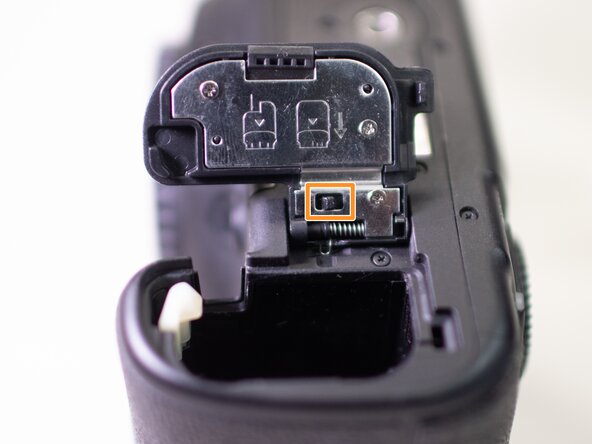
Remove the battery door.
-
Open the battery door and disengage the hinge spring.
-
While holding the spring back, pull off the battery door.
 Ask FixBot
-
-
-
-
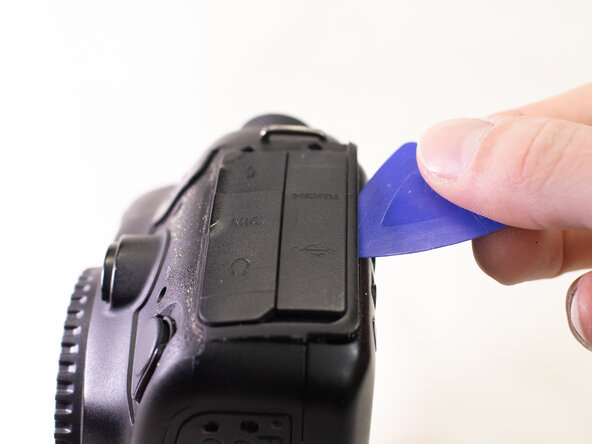
Using a plastic spudger tool, peel off the rubber grip on the left side of the camera.
-
On the Left side of the camera, underneath where the rubber grip was, remove the following screws:
-
Two M1.7x5.0mm Phillips #000 screws.
-
One M1.7x5.0mm Phillips #000 screw.
-
Pry off the plastic interface cover.
-
-





To reassemble your device, follow these instructions in reverse order.

