Free Shipping on Domestic Orders $75+

Canon EOS 5D Mark II Internal Speaker Replacement

What you need

  1. Canon EOS 5D Mark II Internal Speaker Replacement, Clock Battery: step 1, image 1 of 1
    • Lift the rubber flap covering the input/output jacks.

    Ask FixBot
  2. Canon EOS 5D Mark II Internal Speaker Replacement: step 2, image 1 of 1
    • Using a Phillips #000, remove the single 3.4 mm screw.

    Ask FixBot
  3. Canon EOS 5D Mark II Internal Speaker Replacement: step 3, image 1 of 1
    • This step will permanently erase all user settings.

    • The memory battery can now be easily slid out of place.

    • If you are following this guide in an effort to perform a hard reset, you should now press the shutter button multiple times in order to drain any left over power, then replace the batteries and power the device back on. You have just performed a hard reset!

    Ask FixBot
  4. Canon EOS 5D Mark II Internal Speaker Replacement, Back Panel: step 4, image 1 of 1
    • Peel back the rubber cover above the in/out ports to reveal two screw heads.

    Ask FixBot
  5. Canon EOS 5D Mark II Internal Speaker Replacement: step 5, image 1 of 1
    • Remove both 5.4 mm screws using a Phillips #0.

    Ask FixBot
  6. Canon EOS 5D Mark II Internal Speaker Replacement: step 6, image 1 of 1
    • Lift the in/out port plastic covering from the bottom where the backup battery used to be.

    Ask FixBot
  7. Canon EOS 5D Mark II Internal Speaker Replacement: step 7, image 1 of 1
    • Remove each 6.3 mm screw on either side of the viewfinder using a Phillips #0 screwdriver.

    Ask FixBot
  8. Canon EOS 5D Mark II Internal Speaker Replacement: step 8, image 1 of 1
    • Remove the three 4.8 mm screws on the bottom of the back plate using a Phillips #0.

    Ask FixBot
  9. Canon EOS 5D Mark II Internal Speaker Replacement: step 9, image 1 of 1
    • Peel back the rubber covering next to the menu dial to access the screw.

    • Remove the single 3.4 mm screw using a Phillips #0.

    Ask FixBot
  10. Canon EOS 5D Mark II Internal Speaker Replacement: step 10, image 1 of 1
    • The back panel can now fall off easily by turning the device upside down. Be sure to catch it so the data ribbons do not tear or tug.

    Ask FixBot
  11. Canon EOS 5D Mark II Internal Speaker Replacement: step 11, image 1 of 1
    • Remove each data ribbon cable from the motherboard by applying pressure down towards the motherboard and gently sliding your thumb upwards on the slot where the cable meets the motherboard. This will raise a very small clip that locks the cable in place.

    • The back panel is now free from the rest of the device.

    Ask FixBot
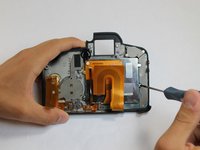
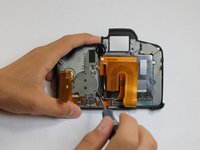
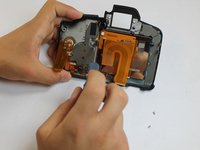
  12. Canon EOS 5D Mark II Internal Speaker Replacement, LCD: step 12, image 1 of 3 Canon EOS 5D Mark II Internal Speaker Replacement, LCD: step 12, image 2 of 3 Canon EOS 5D Mark II Internal Speaker Replacement, LCD: step 12, image 3 of 3
    • Remove each of the 3.4 mm screws holding in the LCD using a Phillips #0.

    Ask FixBot
  13. Canon EOS 5D Mark II Internal Speaker Replacement: step 13, image 1 of 1
    • Grip the wire attaching the speaker to the data ribbon cable and pull it out.

    • The LCD is now free from the back panel.

    Ask FixBot
  14. Canon EOS 5D Mark II Internal Speaker Replacement, Internal Speaker: step 14, image 1 of 1
    • Remove the single 4.8 mm screw using a Phillips #0.

    Ask FixBot
  15. Canon EOS 5D Mark II Internal Speaker Replacement: step 15, image 1 of 1
    • Remove the speaker by firmly gripping the top of the speaker and pulling down towards the bottom of the back panel while rotating the top of the speaker upwards, away from the back panel. This will allow the speaker to come off of its pivot point.

    Ask FixBot
Conclusion

To reassemble your device, follow these instructions in reverse order.

3 other people completed this guide.

Mike Seed

Member since: 09/22/14

3,166 Reputation

8 Guides authored

Team

USF Tampa, Team 1-6, Hickman Fall 2014 Member of USF Tampa, Team 1-6, Hickman Fall 2014

USFT-HICKMAN-F14S1G6

3 Members

17 Guides authored

0 Guide Comments

Add Comment

View Statistics:

Past 24 Hours: 4

Past 7 Days: 10

Past 30 Days: 71

All Time: 2,348