Free Shipping on Domestic Orders $75+

Canon EOS 30 Remote Control Socket Replacement

What you need

  1. Canon EOS 30 Remote Control Socket Replacement, Front Panel: step 1, image 1 of 1
    • Remove the two 4.8 mm black screws above the lens on the front of the camera.

    Ask FixBot

    Add Comment

  2. Canon EOS 30 Remote Control Socket Replacement: step 2, image 1 of 1
    • Remove the 4.3 mm black screw under the lens ring, and the 4.8 mm black screw under the camera.

    Ask FixBot

    Add Comment

  3. Canon EOS 30 Remote Control Socket Replacement: step 3, image 1 of 1
    • Remove the 4.8 mm black screw on the left side of the camera.

    Ask FixBot

    Add Comment

  4. Canon EOS 30 Remote Control Socket Replacement: step 4, image 1 of 1
    • Remove the front panel by lifting it away from the camera's body.

    Ask FixBot

    Add Comment

  5. Canon EOS 30 Remote Control Socket Replacement, Bottom Panel: step 5, image 1 of 1
    • Remove seven 4.25 mm black screws on the bottom panel.

    Ask FixBot

    Add Comment

  6. Canon EOS 30 Remote Control Socket Replacement: step 6, image 1 of 1
    • Remove the bottom panel.

    Ask FixBot

    Add Comment

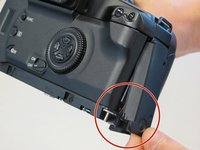
  7. Canon EOS 30 Remote Control Socket Replacement, Side Panel With Remote Control Socket: step 7, image 1 of 1
    • Remove two 6.5 mm black screws from the panel.

    Ask FixBot

    Add Comment

  8. Canon EOS 30 Remote Control Socket Replacement: step 8, image 1 of 1
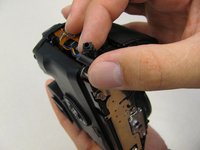
    • Remove the plastic remote control socket cap by pulling it straight out.

    Ask FixBot

    Add Comment

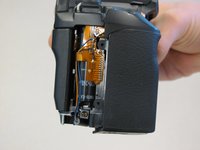
  9. Canon EOS 30 Remote Control Socket Replacement: step 9, image 1 of 2 Canon EOS 30 Remote Control Socket Replacement: step 9, image 2 of 2
    • Slide the panel toward the bottom of the camera to remove.

    Ask FixBot

    Add Comment

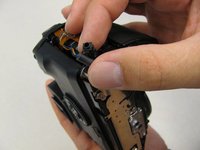
  10. Canon EOS 30 Remote Control Socket Replacement: step 10, image 1 of 1
    • Remove the single 4.8 silver screw from the control socket.

    Ask FixBot

    Add Comment

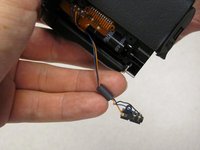
  11. Canon EOS 30 Remote Control Socket Replacement: step 11, image 1 of 2 Canon EOS 30 Remote Control Socket Replacement: step 11, image 2 of 2
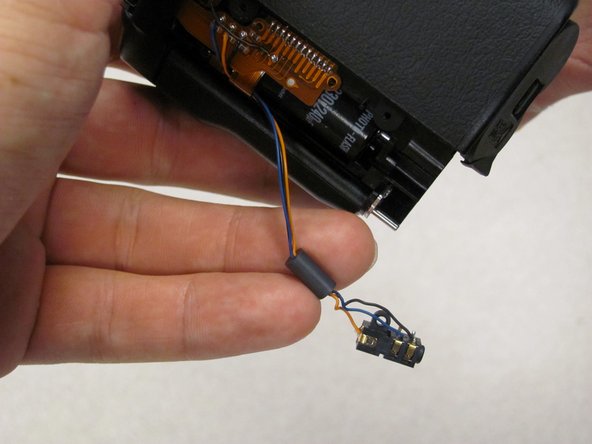
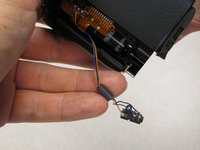
    • The control socket is now secure by three wires.

    • Desolder connections to replace the remote control socket.

    Ask FixBot

    Add Comment

  12. Canon EOS 30 Remote Control Socket Replacement, Remote Control Socket: step 12, image 1 of 1
    • Remove one 4.8 mm silver screw securing Remote Control Socket to camera.

    Ask FixBot

    Add Comment

  13. Canon EOS 30 Remote Control Socket Replacement: step 13, image 1 of 2 Canon EOS 30 Remote Control Socket Replacement: step 13, image 2 of 2
    • Remote Control Socket is now secured by 3 wires.

    • Desolder connections to replace Remote Control Socket.

    Ask FixBot

    Add Comment

Conclusion

To reassemble your device, follow these instructions in reverse order.

Cancel: I did not complete this guide.

2 other people completed this guide.

Antonia

Member since: 04/17/11

124 Reputation

2 Guides authored

Team

Cal Poly, Team 8-8, Regan Spring 2011 Member of Cal Poly, Team 8-8, Regan Spring 2011

CPSU-REGAN-S11S8G8

5 Members

22 Guides authored

0 Guide Comments

Add Comment

View Statistics:

Past 24 Hours: 3

Past 7 Days: 11

Past 30 Days: 44

All Time: 3,420