Introduction
If the handheld unit of your CamPark BM20 is not turning on, follow this guide to replace the battery.
Most of the time, when a device fails to turn on, it's because the device is dead and needs to be charged. But sometimes the battery itself is dead, and that's where this guide will come in handy.
Before starting this repair, make sure the device is powered off completely.
-
-
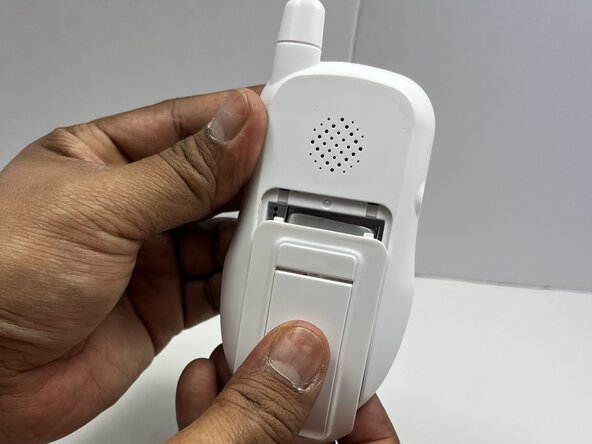
Flip the handheld monitor so the back is facing you.
-
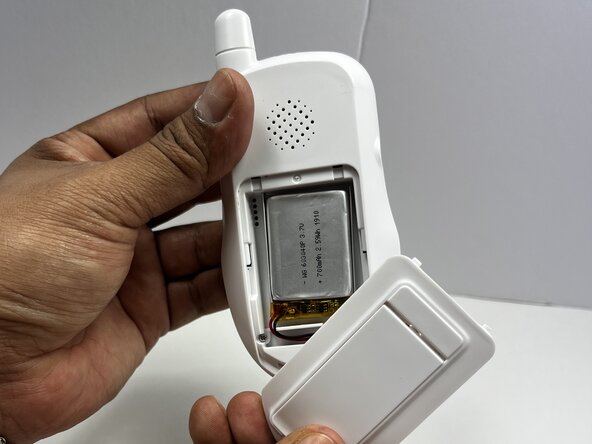
Use your fingers to slide the battery cover off to access the battery.
 Ask FixBot
-
-
-
-
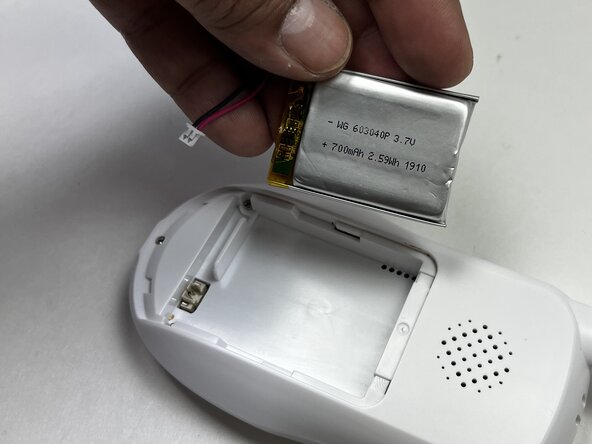
Use a spudger or your fingers to unplug the battery cable from the handheld device.
-
Remove the battery.
-





To reassemble your device, follow these instructions in reverse order. Take your e-waste to an R2 or e-Stewards certified recycler.

Team

Austin Community College, Team 18-2, Watkins Spring 2025 Member of Austin Community College, Team 18-2, Watkins Spring 2025
AUSTINCC-WATKINS-S25S18G2
3 Members
3 Guides authored
