Introduction
A graphing process may take long if the zoom is not appropriate, or the resolution is too high.
-
-
-
To cancel the graphing process, press the "ON" button.
 Ask FixBot
-
-
-
Go to "Zoom." Navigate to and highlight "ZoomFit" then press "Enter." Doing so will automatically set your graphing window to the most appropriate dimensions.
-
-
-
-
If you are graphing complex equations, multiple equations, or a combination of the two, it may take anywhere from 1 minute to 5 minutes to graph.
-
-
-
If you feel that your graph is taking too long, you can change the step resolution to a bigger number. To do so, press "Window" and change "Xres" to a value between 1 and 8. A bigger Xres value will graph more quickly.
-
-


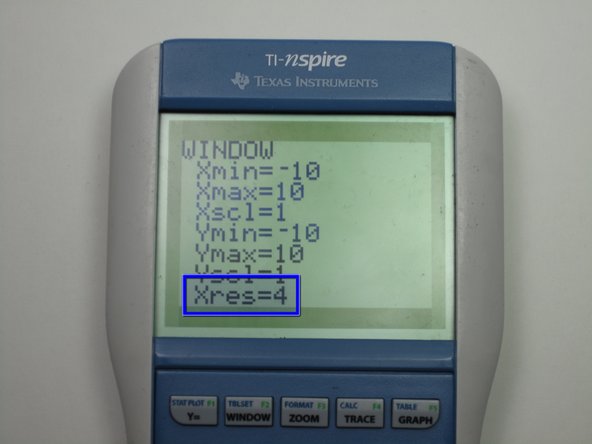
It is always a good idea to make sure your graph will display a good window.

Team

Cal Poly, Team 7-52, Forte Fall 2012 Member of Cal Poly, Team 7-52, Forte Fall 2012
CPSU-FORTE-F12S7G52
5 Members
108 Guides authored
