
CAT S22 Flip Back Screen Replacement

Noah White and
Last updated on Dec 31, 2025
Views: 920
View statistics:
- Past 24 Hours:
- 5
- Past 7 Days:
- 25
- Past 30 Days:
- 109
- All Time:
- 920
Comments: 1
1 comment on steps.
Completed: 0 1
No one has marked this guide "completed." Will you be the first?
1 person has marked this guide "completed." It's you — great job!
Favorites: 0 1
No one has favorited (and subscribed to) this guide. Will you be the first?
1 person has favorited (and subscribed to) this guide — and that's you!
Featured Student Guide
This guide has been the hard work of our awesome students and is found to be exceptionally cool by the iFixit staff.
What you need
Tools
-
-
-
Spudger4.9
-


Introduction
Go to step 1 ↓This guide will go over replacing the CAT 22 Flip backscreen. The back screen of the CAT S22 Flip displays time and Android widgets.
A faulty back screen may not display properly.
-
-
-
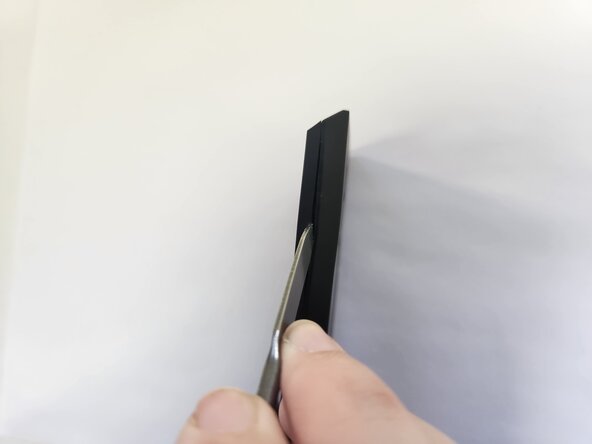
Insert a metal spudger into the seam of the phone frame.
-
Apply a downward force on the metal spudger to create a gap.
 Ask FixBot
-
-
-
Insert a jimmy into the gap.
-
Use the jimmy to wedge the front panel free from the frame.
-
-
-
-
Use a J00 JIS screwdriver to remove the four wide 3.3 mm-long screws.
-
Use a J00 JIS screwdriver to remove the four narrow 3.3 mm-long screws.
-
-
-
Use the flat end of a spudger to gently disconnect the back screen press connector.
-
-


To reassemble your device, follow the above steps in reverse order.
Take your e-waste to an R2 or e-Stewards certified recycler.
Repair didn’t go as planned? Try some basic troubleshooting or ask our Answers community for help.

Team

University of North Texas, Team 2-5, Harold Fall 2025 Member of University of North Texas, Team 2-5, Harold Fall 2025
UNT-HAROLD-F25S2G5
4 Members
96 Guides authored
