
Braun Trimmer Battery Replacement and Modification

elwiwian and one other contributor
Last updated on Feb 2, 2023
Views: 17K
View statistics:
- Past 24 Hours:
- 14
- Past 7 Days:
- 198
- Past 30 Days:
- 907
- All Time:
- 17,191
Comments: 7
5 comments on steps, 2 guide comments.
Go to guide commentsCompleted: 8 9
8 people have marked this guide "completed." Will you be next?
9 people have marked this guide "completed." Including you — great job!
Favorites: 2 3
2 people have favorited (and subscribed to) this guide. Will you be next?
3 people have favorited (and subscribed to) this guide — including you!
Bullets!
Better coordination with markups and the color/type of bullets will help make this guide more clear!
Community-Contributed Guide
An awesome member of our community made this guide. It was not created by iFixit staff.
Introduction
Go to step 1 ↓In this guide, I describe how I replaced rechargeable batteries in my Braun Trimmer. The original batteries started losing their capacity after the first year of using the trimmer. So I decided to include a 3D-printed battery case in the trimmer to ease the process of battery replacement in the future. Plus, this approach doesn't require any soldering that could potentially harm the new batteries.
What you need
Parts
-
×2
Tools


-
-
-
First you need to disassemble the trimmer.
-
To access the four screws you would need first to open the frontal cover. Use opening picks, starting from the bottom of the trimmer
-
For detailed disassembly refer to another article on iFixit
 Ask FixBot
-
-
-
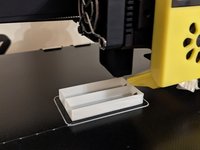
Print a holder for your new batteries on a 3D printer
-
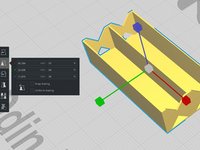
I used a modified 3D model from ThingVerse
-
The original model is too big for the trimmer case. I modified the scale like following: X 97%, Y 84%; Z 95%
-
I stopped the printing at 60% of completion to keep the holder low enough to fit the trimmer case
-
-
-
Remove the original dead batteries
-
I didn't have a soldering iron, so I used a heated knife to slowly detach the batteries from the connectors. It worked okay
-
-
-
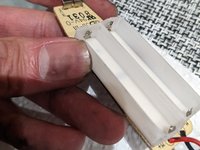
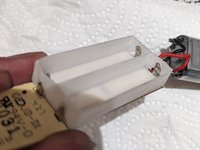
Place the 3D-printed battery case on the board so the connectors would go inside the case as you see on the pictures
-
-
-
Place the new batteries into the case. Pay attention to polarities
-
Before full assembly, you can test if the new batteries are charging
-
-
-






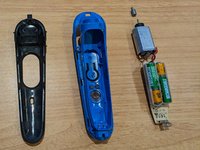
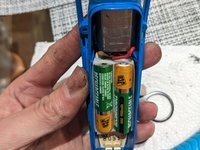
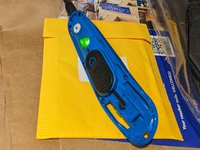


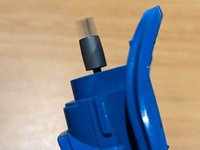
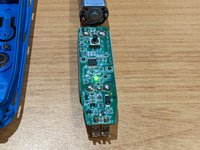


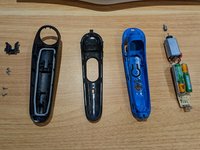
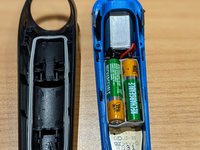
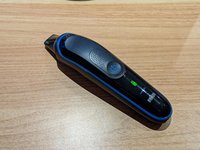




My old batteries barely lasted one minute of shaving, and never held any charge. I didn't test the full working time of the new batteries, but they allowed me to use the trimmer at least for 10 minutes.
Thanks to adding the battery holder next battery replacement would be way easier and faster.
Cancel: I did not complete this guide.
8 other people completed this guide.
2 Guide Comments
Would you provide the specs of the original batteries (mAh and Voltage)? So one can order spare parts in advance.
@hffnp the batteries depend on your exact unit. Some use a single SANYO CH UR14500AC LI-ION 740MAH (https://www.youtube.com/watch?v=nCjZmS0h...). mine, and probably the OP's, were two SUPPO HS-AAA0.75 NIMH 1.2V, aka ordinary AAA NiMH 1.2volt 750mAh batteries. Thats why they used ordinary rechargeable AAAs as replacements. Some other models use a single AAA, but of the same specs (https://www.youtube.com/watch?v=P16yy_3F...)
