Free Shipping on Domestic Orders $75+

Bose Soundlink Revolve Bottom Circuit Board Replacement

What you need

    1. Bose Soundlink Revolve Bottom Circuit Board Replacement, Bottom Circuit Board Access: step 1, image 1 of 2 Bose Soundlink Revolve Bottom Circuit Board Replacement, Bottom Circuit Board Access: step 1, image 2 of 2
      • Flip speaker over so that the bottom is facing up.

      • Using the blue spudger, lift the gray foam up and slowly peel it off with your hand.

      Ask FixBot

      Add Comment

    2. Bose Soundlink Revolve Bottom Circuit Board Replacement: step 2, image 1 of 3 Bose Soundlink Revolve Bottom Circuit Board Replacement: step 2, image 2 of 3 Bose Soundlink Revolve Bottom Circuit Board Replacement: step 2, image 3 of 3
      • Using the screwdriver, unscrew three screws.

      • Detach the bottom cover from the rest of the speaker by pulling the two in opposite directions.

      Ask FixBot

      Add Comment

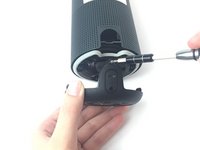
    3. Bose Soundlink Revolve Bottom Circuit Board Replacement: step 3, image 1 of 2 Bose Soundlink Revolve Bottom Circuit Board Replacement: step 3, image 2 of 2
      • Remove the screw that is above the charging port.

      Ask FixBot

      Add Comment

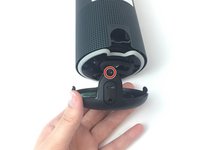
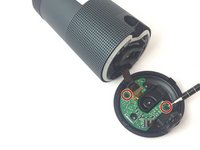
    4. Bose Soundlink Revolve Bottom Circuit Board Replacement: step 4, image 1 of 2 Bose Soundlink Revolve Bottom Circuit Board Replacement: step 4, image 2 of 2
      • Remove the two screws connecting the motherboard to the bottom cover of the speaker.

      • Remove the bottom cover.

      Ask FixBot

      Add Comment

    1. Bose Soundlink Revolve Bottom Circuit Board Replacement, AUX/USB Port: step 5, image 1 of 3 Bose Soundlink Revolve Bottom Circuit Board Replacement, AUX/USB Port: step 5, image 2 of 3 Bose Soundlink Revolve Bottom Circuit Board Replacement, AUX/USB Port: step 5, image 3 of 3
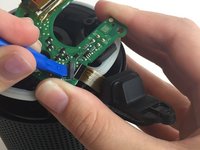
      • Using the blue plastic opening tool, pry up the small black clamp connecting the AUX/USB port to the lower circuit board.

      • Remove the AUX/USB port from the device.

      Ask FixBot

      Add Comment

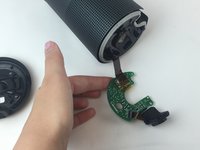
    1. Bose Soundlink Revolve Bottom Circuit Board Replacement, Bottom Circuit Board: step 6, image 1 of 1
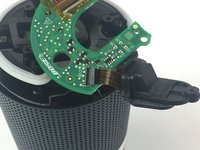
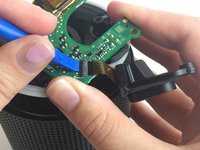
      • Remove the yellow tape over the location where the ribbon from the central speaker meets the bottom circuit board.

      • Use the blue plastic opening tool to pry up the black latch holding down the ribbon.

      • Remove the motherboard from the device.

      Ask FixBot

      Add Comment

Conclusion

To reassemble your device, follow these instructions in reverse order.

Cancel: I did not complete this guide.

7 other people completed this guide.

Brian Butner

Member since: 09/27/17

927 Reputation

3 Guides authored

Team

USF Tampa, Team S6-G2, Remmell Fall 2017 Member of USF Tampa, Team S6-G2, Remmell Fall 2017

USFT-REMMELL-F17S6G2

4 Members

12 Guides authored

43 Guide Comments

I need the ribbon because it is damage, can you sell one to me?

My email is ttegil@hotmail.com can you send me the way I can buy it.

Kind regards

Gilberto - Reply Share

Hello do toi fond thé ribbon because i have thé same problème .

M'y email adresse thualromain44.rt@gmail.com

Thanks you

romain thual - Reply Share

Hi I need bottom circuit board for bose revolve , could you sale it for me. mail: seawolf1974@mail.ru , delivery to Spain

kindly regards

seawolf1974 - Reply Share

I need bottom circuit board for Bose revolve, can I get it available in Nigeria, @sullivaniheme@gmail.com

Sullivan - Reply Share

Hey there, I also require the bottom circuit board for my Bose Revolve sam.rowlands@hotmail.com

Sam - Reply Share

Add Comment

View Statistics:

Past 24 Hours: 5

Past 7 Days: 19

Past 30 Days: 132

All Time: 17,902