Free Shipping on Domestic Orders $75+

Bose Soundlink Flex Battery Replacement

Views: 9.6K

View statistics:

Past 24 Hours:
9
Past 7 Days:
91
Past 30 Days:
406
All Time:
9,643
Comments: 3

2 comments on steps, 1 guide comment.

Go to guide comments
Completed: 6

6 people have marked this guide "completed." Will you be next?

Favorites: 0

No one has favorited (and subscribed to) this guide. Will you be the first?

Time Required: 45 minutes
Difficulty: Moderate
Bose Soundlink Flex Battery Replacement

Introduction

Go to step 1 ↓

Having trouble turning your speaker on? Then you probably need to replace the battery. This guide will show you how to properly replace the battery of the Bose Soundlink Flex speaker. Otherwise, the speaker's battery may be dead; it takes around 4 hours to charge to 100%.

What you need

Parts

Tools

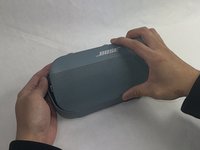
    1. Bose Soundlink Flex Battery Replacement, Grille: step 1, image 1 of 1
      • Use a heat gun to warm up the device.

      • This will allow for an easier removal of the grille and prevent damage to the device during the replacement. If you do not have access to a heat gun, a hair dryer works as well.

      Ask FixBot

      Add Comment

    2. Bose Soundlink Flex Battery Replacement: step 2, image 1 of 1
      • Use an iFixit opening tool to pop off the eight clips on the grille.

      • Be patient and do not rush this process as you may otherwise damage the device.

      Ask FixBot

      Add Comment

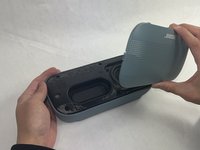
    3. Bose Soundlink Flex Battery Replacement: step 3, image 1 of 2 Bose Soundlink Flex Battery Replacement: step 3, image 2 of 2
      • Once the clips have been released, the only thing holding the grille on is glue.

      • Apply minimal force and the grille should pop right off the device.

      • Reheat the device to warm up the glue if there is difficulty in removing.

      Ask FixBot

      Add Comment

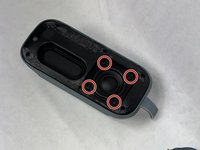
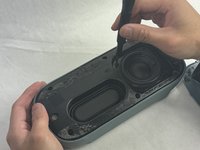
    1. Bose Soundlink Flex Battery Replacement, Battery: step 4, image 1 of 3 Bose Soundlink Flex Battery Replacement, Battery: step 4, image 2 of 3 Bose Soundlink Flex Battery Replacement, Battery: step 4, image 3 of 3
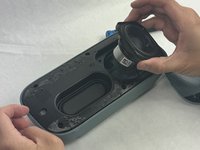
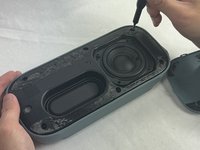
      • Remove the four 2.3 mm screws holding the driver in place using a TR8 Torx screwdriver.

      • Lift the driver out, being cautious of the wires still connected to the device.

      Ask FixBot

      Add Comment

    2. Bose Soundlink Flex Battery Replacement: step 5, image 1 of 3 Bose Soundlink Flex Battery Replacement: step 5, image 2 of 3 Bose Soundlink Flex Battery Replacement: step 5, image 3 of 3
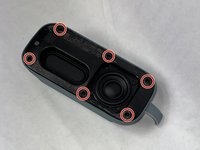
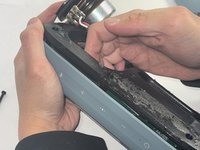
      • Remove the six 2.3 mm screws around the edge with a TR8 Torx screwdriver.

      • Pull the back panel off exposing the motherboard.

      Ask FixBot

      Add Comment

    3. Bose Soundlink Flex Battery Replacement: step 6, image 1 of 2 Bose Soundlink Flex Battery Replacement: step 6, image 2 of 2
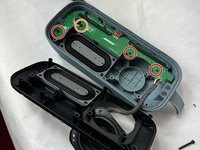
      • Remove the three 1.7 mm screws from the motherboard using a TR6 Torx screwdriver.

      • Remove the single 1.4 mm screw from the motherboard using a TR5 Torx screwdriver.

      Ask FixBot

      Add Comment

    4. Bose Soundlink Flex Battery Replacement: step 7, image 1 of 3 Bose Soundlink Flex Battery Replacement: step 7, image 2 of 3 Bose Soundlink Flex Battery Replacement: step 7, image 3 of 3
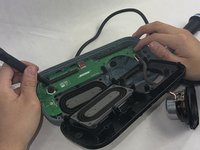
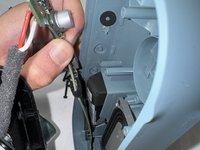
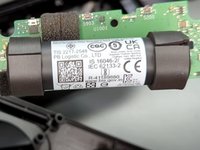
      • Take the motherboard out and take note of the battery attached.

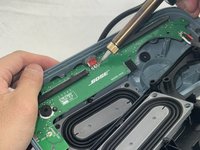
      • Remove the insulation and the solder from the wiring.

      • Be careful not to damage the motherboard. Doing so will create a slew of problems for the speaker.

      • Solder the wires of the new battery onto the motherboard.

      • Be cautious when adding the solder to not damage the motherboard or burn yourself.

      Ask FixBot

      Add Comment

Conclusion

To reassemble your device, follow these instructions in reverse order.

Cancel: I did not complete this guide.

6 other people completed this guide.

Kalvin Lee

Member since: 03/19/24

625 Reputation

3 Guides authored

Team

1 Guide Comment

How do I know which one is the positive and which one is the negative side of my battery connector in soundlink flex ? As I have already removed the old battery only.

SOM SATPATHY - Reply Share

Add Comment

View Statistics:

Past 24 Hours: 9

Past 7 Days: 91

Past 30 Days: 406

All Time: 9,643