Introduction
The back panel houses the motherboard for the speaker. It needs to be removed in order to replace the motherboard as well as several other components.
The motherboard in this guide contains capacitors which can hold a charge even when the speaker is powered off. Do not touch the as it may result in a shock.
What you need
-
-
-
Turn the speaker over so that the rubber strips along the bottom are facing you.
-
Use the iFixit Opening Tool to peel back the rubber strip on the bottom-front edge.
 Ask FixBot
-
-
-
Use a #2 Phillips screwdriver to remove each of the three 20mm screws on the bottom front edge of the speaker.
-
-
-
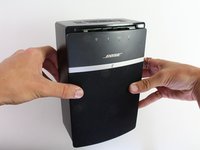
Slide the front panel with the mesh covering downwards to disconnect it from the SoundTouch 10 body.
-
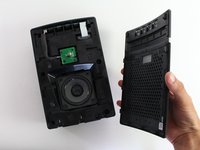
Lift the panel away to reveal the speaker head.
-
-
-
-
-
-
Use a #2 Phillips screwdriver to remove each of the six 20mm screws located underneath the front panel.
-
-
-
Flip the speaker onto its back.
-
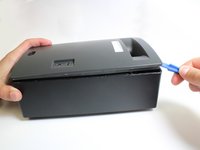
Loosen the adhesive by sliding a Metal Spudger under the edge where the back panel meets the speaker's body.
-
-
-
Use force with an iFixit Plastic Opening Tool to pry the back panel up from the speaker frame.
-
-
Tool used on this step:Tweezers$4.99
-
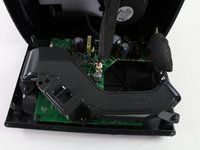
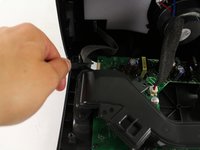
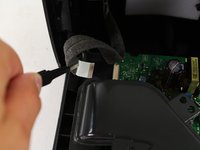
Use ESD Safe Tweezers (Blunt Nose) to pull out the wire ribbon at the end of the motherboard.
-
-
-
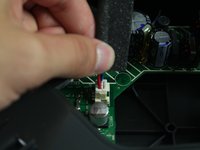
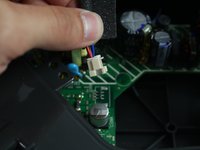
Pull up on the base of the speaker wire plug to disconnect it from the motherboard.
-
-








To reassemble your device, follow these instructions in reverse order.
Cancel: I did not complete this guide.
5 other people completed this guide.

Team

Cal Poly, Team S13-G1, Forte Spring 2017 Member of Cal Poly, Team S13-G1, Forte Spring 2017
CPSU-FORTE-S17S13G1
4 Members
60 Guides authored
