
Bose SoundLink Color Outer Casing Replacement

Michael Thorn and 7 other contributors
Last updated on Oct 16, 2023
Views: 34K
View statistics:
- Past 24 Hours:
- 11
- Past 7 Days:
- 50
- Past 30 Days:
- 205
- All Time:
- 34,251
Comments: 53
41 comments on steps, 12 guide comments.
Go to guide commentsCompleted: 13 14
13 people have marked this guide "completed." Will you be next?
14 people have marked this guide "completed." Including you — great job!
Favorites: 0 1
No one has favorited (and subscribed to) this guide. Will you be the first?
1 person has favorited (and subscribed to) this guide — and that's you!
Better Introduction
Improve this guide by completing or revising its introduction.
Introduction
Go to step 1 ↓This guide will show how to remove the 4 screws that are holding the two parts of the casing together and how to separate the casing for replacement.
What you need
Tools


 Ask FixBot


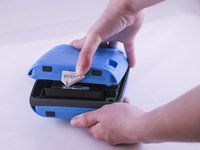
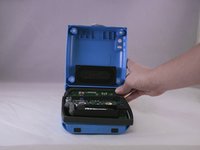
To reassemble your device, follow these instructions in reverse order.
Cancel: I did not complete this guide.
13 other people completed this guide.

Team

Eastern Washington University, Team 1-4, Giguere Spring 2016 Member of Eastern Washington University, Team 1-4, Giguere Spring 2016
EWU-GIGUERE-S16S1G4
5 Members
48 Guides authored
12 Guide Comments
When I search for a 1.8 cm Torx Plus TR drill bit, I see a whole set from Amazon. Is there a particular number or head size just so I can purchase one drill bit?
