Introduction
The Blink Video Doorbell is a doorbell to provide extra security to your residence by giving you an accessible view whenever necessary. The batteries play an important role in the function of the device. Make sure to change the batteries as necessary as the device won't function without it. Refer to the troubleshooting page if there are issues with the batteries which could be connected to causes such as battery failure, software failure, and frozen screen.
What you need
-
-
Push the opening key into the small opening with the two gray buttons on the bottom of the device.
-
Push the device up from the mount and slide it off.
 Ask FixBot
-
-
-
-
Use your finger to slide the gray tab, located near the bottom of the device, upwards.
-
Remove the battery cover.
-
-
-
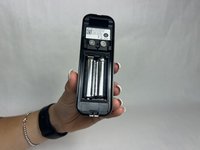
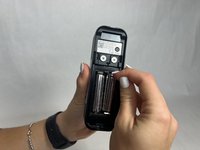
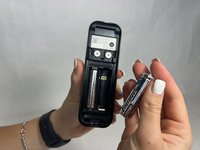
Remove the right battery by pushing the positive end down and pulling the battery out toward yourself.
-
Repeat the procedure for the left battery.
-


To reassemble your device, follow these instructions in reverse order.
Cancel: I did not complete this guide.
3 other people completed this guide.

Team

UMass Dartmouth, Team 1-1, Konn Fall 2024 Member of UMass Dartmouth, Team 1-1, Konn Fall 2024
UMASSD-KONN-F24S1G1
4 Members
5 Guides authored
