Introduction
This guide provides step-by-step instructions on how to replace the motherboard in the Blink Outdoor 4. This is necessary when the camera is not connecting or picking up any motion through the Blink Mobile App. When the motion sensors are not working, it is important to replace the motherboard as a whole because the sensors cannot be replaced individually. The motion sensors use passive infrared (PIR) sensors to detect motion. The sensor has a lens called the Fresnel Lens that splits the view into different zones. As an object leaves one zone and enters another the sensor triggers a motion. Therefore the sensors work best when objects move across the field rather than towards it. Since the motion sensor relies on changes to heat and not light, it can still detect motion at night.
There could be multiple reasons that the sensors are not working. Before taking it apart check and make sure that you have adjusted the motion sensitivity on The Blink App. Also make sure that you have not created an activity zone to be ignored on The Blink App. The sensor may not be able to detect the heat changes if the camera is too far away. The optimal deception range is 7 to 19 feet facing slightly downward. The camera may also miss a motion if it happens too quickly after a prior one. There is a setting in The Blink App to adjust how quickly the camera can record a clip after a motion. If there is dirt or smudges on the camera lens the sensors may not be able to detect that properly and send a false alert. The camera being placed next to a vent may also cause false alerts due to the hot air.
Before getting started, it is important to know what you are looking for. Click here to contact Blink support directly if you have more questions.
If your device has been purchased within the same year, you are eligible for the one-year limited warranty that includes repair or replacement for broken materials.
If the device is mounted, you will have to remove it from the mount. Once you have done so, feel free to take the device indoors or to a flat surface.
What you need
-
-
-
If the mounting bracket is attached, remove it from the back of the device.
-
Flip the camera upside down.
-
Insert the swivel multi-tool that was included in the Blink Outdoor 4 box into the small notch located inside the silver circle in the center of the device.
-
Twist to the left until you hear a click.
 Ask FixBot
-
-
-
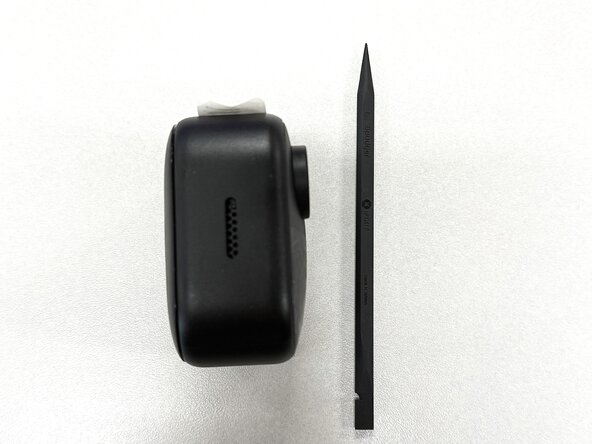
Insert a spudger between the back casing and the device, then gently pry the casing loose.
-
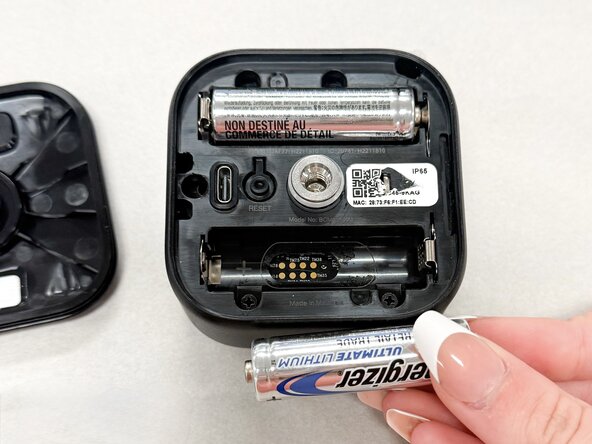
Remove the two AA batteries and set them aside.
-
-
-
Use a Phillips #1 screwdriver to remove four screws near the battery compartments.
-
-
-
-
Turn the device on its side.
-
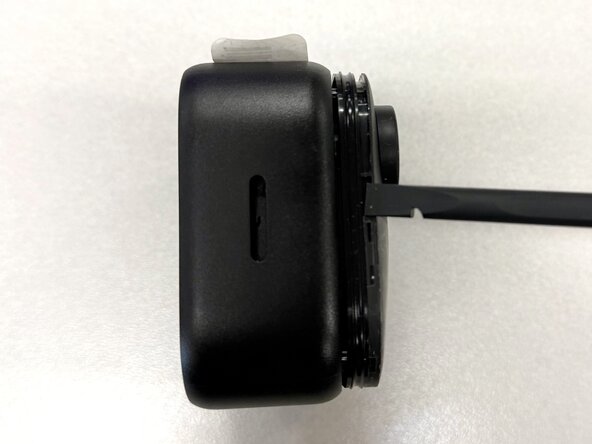
Use a plastic spudger to gently pry off the front cover of the device.
-
-
-
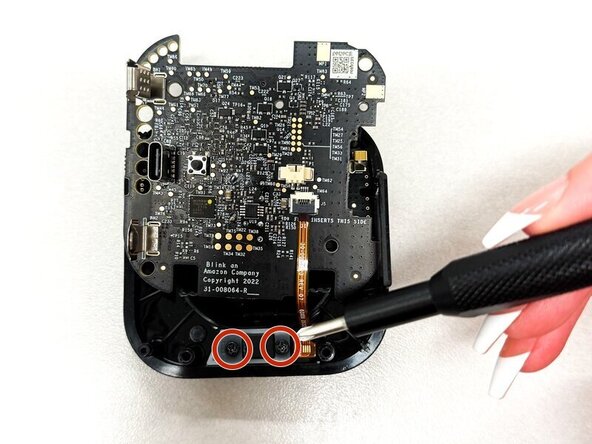
Use a Phillips #00 screwdriver to remove the two small black screws in the upper right corner of the board.
-
-
-
Gently lift the motherboard out of the device by its edges.
-
Use the point of a spudger to push on alternating sides of the white camera connector to "walk" it out of its socket.
-
Remove the camera from the device.
-
-
-
Place the motherboard on top of the base of the device.
-
Use a Phillips #0 screwdriver to remove two screws from the white bracket.
-
Remove the black and white brackets.
-
-
-
Use a spudger or a clean fingernail to flip up the black locking flap—this is the unlocked position.
-
Gently pull the orange microphone cable out of its motherboard socket using tweezers or your fingers to remove the microphone.
-
-








To reassemble your device, follow these instructions in reverse order. Take your e-waste to an R2 or e-Stewards certified recycler.

Team

Texas Tech, Team 11-5, Weston Spring 2026 Member of Texas Tech, Team 11-5, Weston Spring 2026
TTU-WESTON-S26S11G5
5 Members
60 Guides authored
