Introduction
Replacement of the Memory Card is a simple replacement that will improve storage capabilities on the phone. The Memory Card is fragile and must be handled with care.
-
-
Place phone screen down.
-
Use your finger to life upward on the battery case.
-
Pull the cover away from the battery.
-
-
-
-
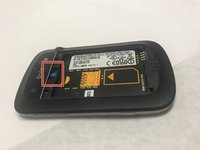
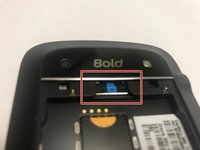
The MicroSD card is located where the red rectangle is shown.
-
To remove MicroSD card, push the card inward towards the top of the phone then release. The MicroSD card will be ejected.
-


To reassemble your device, follow these instructions in reverse order.
Cancel: I did not complete this guide.
One other person completed this guide.

Team

Baylor, Team S1-G4, Johnson Spring 2018 Member of Baylor, Team S1-G4, Johnson Spring 2018
BU-JOHNSON-S18S1G4
3 Members
12 Guides authored
