Free Shipping on Domestic Orders $75+

Blackberry Bold 9900 Back Case Replacement

What you need

  1. Blackberry Bold 9900 Back Case Replacement, Battery: step 1, image 1 of 1
    • Place phone screen down.

    • Use your finger to life upward on the battery case.

    • Pull the cover away from the battery.

    Ask FixBot

    Add Comment

  2. Blackberry Bold 9900 Back Case Replacement: step 2, image 1 of 1
    • Lift the edge of battery with the green stripe upward to remove battery.

    Ask FixBot

    Add Comment

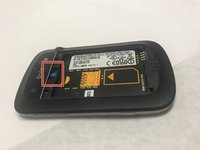
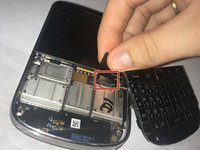
  3. Blackberry Bold 9900 Back Case Replacement, Mini-SIM removal: step 3, image 1 of 1
    • The Mini-SIM card is located inside the red rectangle.

    • To remove the Mini-SIM Card, push and slide the card inward towards the top of the phone. It will be ejected.

    Ask FixBot

    Add Comment

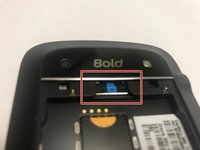
  4. Blackberry Bold 9900 Back Case Replacement, MicroSD card: step 4, image 1 of 2 Blackberry Bold 9900 Back Case Replacement, MicroSD card: step 4, image 2 of 2
    • The MicroSD card is located where the red rectangle is shown.

    • To remove MicroSD card, push the card inward towards the top of the phone then release. The MicroSD card will be ejected.

    Ask FixBot

    Add Comment

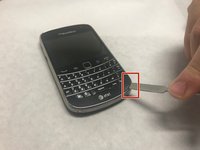
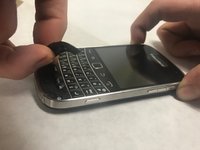
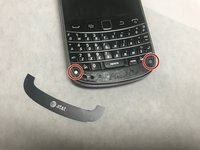
  5. Blackberry Bold 9900 Back Case Replacement, Keyboard: step 5, image 1 of 2 Blackberry Bold 9900 Back Case Replacement, Keyboard: step 5, image 2 of 2
    • Lift the bezel at the bottom of the phone up and peel it away from the phone.

    Ask FixBot

    Add Comment

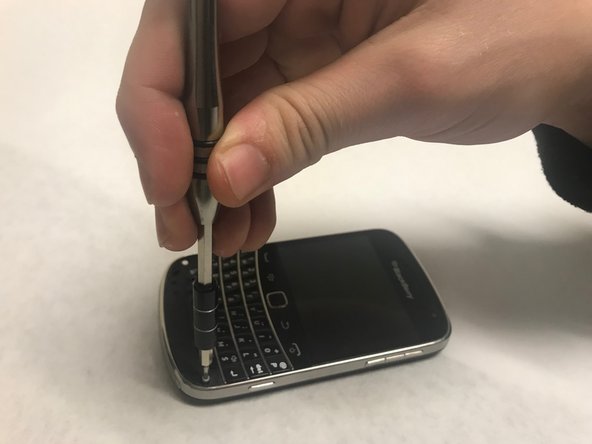
  6. Blackberry Bold 9900 Back Case Replacement: step 6, image 1 of 2 Blackberry Bold 9900 Back Case Replacement: step 6, image 2 of 2
    • Remove the two exposed screws using the T5 Torx screwdriver.

    Ask FixBot

    Add Comment

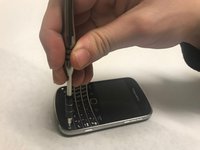
  7. Blackberry Bold 9900 Back Case Replacement: step 7, image 1 of 1
    • Now lever the keyboard up using the screwdriver in the indicated hole.

    Ask FixBot

    Add Comment

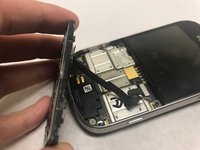
  8. Blackberry Bold 9900 Back Case Replacement: step 8, image 1 of 2 Blackberry Bold 9900 Back Case Replacement: step 8, image 2 of 2
    • The keyboard is attached via a ribbon cable. Pull the cable up to remove the keyboard.

    Ask FixBot

    Add Comment

  9. Blackberry Bold 9900 Back Case Replacement, Back Case: step 9, image 1 of 1
    • Using the T5 Torx Screwdriver, remove the four torx screws that are located on the bottom half of the device

    Ask FixBot

    Add Comment

  10. Blackberry Bold 9900 Back Case Replacement: step 10, image 1 of 1
    • Now, carefully and gently using your fingers, lift and remove the assembly from the back case.

    Ask FixBot

    Add Comment

Conclusion

To reassemble your device, follow these instructions in reverse order.

Cancel: I did not complete this guide.

3 other people completed this guide.

Sowmika

Member since: 01/30/18

256 Reputation

2 Guides authored

Team

Baylor, Team S1-G4, Johnson Spring 2018 Member of Baylor, Team S1-G4, Johnson Spring 2018

BU-JOHNSON-S18S1G4

3 Members

18 Guides authored

0 Guide Comments

Add Comment

View Statistics:

Past 24 Hours: 3

Past 7 Days: 12

Past 30 Days: 57

All Time: 2,205